
At the end of the last post, you understood how a device is found on a network: by its IP address, the logical location that routing depends on. But then I pointed out something you have probably never stopped to notice. In your entire life online, you have never once typed an IP address to reach a website. You do not open your browser and type 142.250.72.14. You type google.com.
So something, somewhere, is quietly translating the human name you type into the machine address the network needs. That something is DNS, the Domain Name System, and it is one of the largest, oldest, and most essential systems on the entire internet. Every website you visit, every email you send, every app that connects to a server, begins with a DNS lookup. It happens so fast and so invisibly that most people never know it is there.
This post pulls it into the light. What DNS is and why it exists, the surprisingly involved journey that happens in the fraction of a second between typing a name and the page appearing, the different kinds of records DNS holds, and then the part this series always comes back to: how a system built for a trusting world became one of the most abused surfaces on the internet, and what defends it.
What DNS Actually Is
Let us start with the problem DNS solves, because it is a genuinely human one.
Computers locate each other using IP addresses, numbers like 142.250.72.14, or the far longer strings of an IPv6 address. Machines are perfectly happy with these. Humans are not. Nobody wants to memorise a string of digits for every website they visit, and even if you did, those numbers change. A company can move its website to a new server with a new IP address, and if you had memorised the old number, you would be stuck.
DNS is the system that lets humans use names while machines use numbers. The classic description, and it is a good one, is that DNS is the phone book of the internet. In an old telephone directory, you looked up a person's name to find their number, because you remember names, not numbers. DNS does exactly this. You provide a name, google.com, and DNS returns the current number, the IP address, that the network actually needs to route your request.
This layer of translation is quietly one of the most important ideas on the internet, because it decouples the name from the location. The name google.com can stay the same forever, building trust and recognition, while the actual servers behind it can move, multiply, and change addresses freely. DNS is the flexible link between the stable human-facing name and the shifting machine-facing address. Without it, the web as we know it, built on memorable names and links, could not exist.
The Resolution Journey: What Actually Happens
Here is where it gets genuinely interesting. When you type a name and hit enter, the translation is not a single lookup in one big table somewhere. It is a small relay race across a globally distributed hierarchy of servers, each one knowing just enough to point you to the next. This process is called DNS resolution, and understanding its steps is the heart of understanding DNS.
There are four kinds of players in this race. Let us meet them, then watch them run.
The stub resolver is the simple piece of software built into your operating system. It does not do the hard work itself. It just asks a question and waits for an answer. When your browser needs an address, it hands the request to the stub resolver.
The recursive resolver, often called just the resolver or the recursor, is the workhorse. It is usually run by your internet provider, or a public service like Cloudflare's 1.1.1.1 or Google's 8.8.8.8. Its job is to take your question and do whatever it takes to find the answer, then hand it back. It is the middleman that manages the entire search on your behalf.
The root nameservers sit at the very top of the hierarchy. There are 13 of them, known to every recursive resolver on earth. They do not know the address of google.com, but they know where to send you to get closer: to the right top-level domain servers.
The TLD nameservers are responsible for a specific top-level domain, the last part of a name, like .com, .org, or .uk. The .com TLD servers do not know google.com's address either, but they know which servers do: the authoritative nameservers for that specific domain.
The authoritative nameservers are the final source of truth. They hold the actual DNS records for a domain. When the query reaches them, they give the definitive answer.
Now watch the race for www.example.com, assuming nothing is cached yet:
- Your browser asks the stub resolver in your OS for the address of www.example.com.
- The stub resolver forwards the question to the recursive resolver (say, your ISP's, or 1.1.1.1).
- The recursive resolver asks a root nameserver: "where do I find .com addresses?" The root server replies with a referral: "go ask the .com TLD servers, here they are."
- The recursive resolver asks a .com TLD nameserver: "where do I find example.com?" The TLD server replies with another referral: "go ask example.com's authoritative servers, here they are."
- The recursive resolver asks the authoritative nameserver for example.com: "what is the address of www.example.com?" This server holds the real record and replies with the actual IP address.
- The recursive resolver hands that IP address back to your stub resolver, which hands it to your browser.
- Your browser, finally holding the IP address, opens a connection to that server and requests the page.
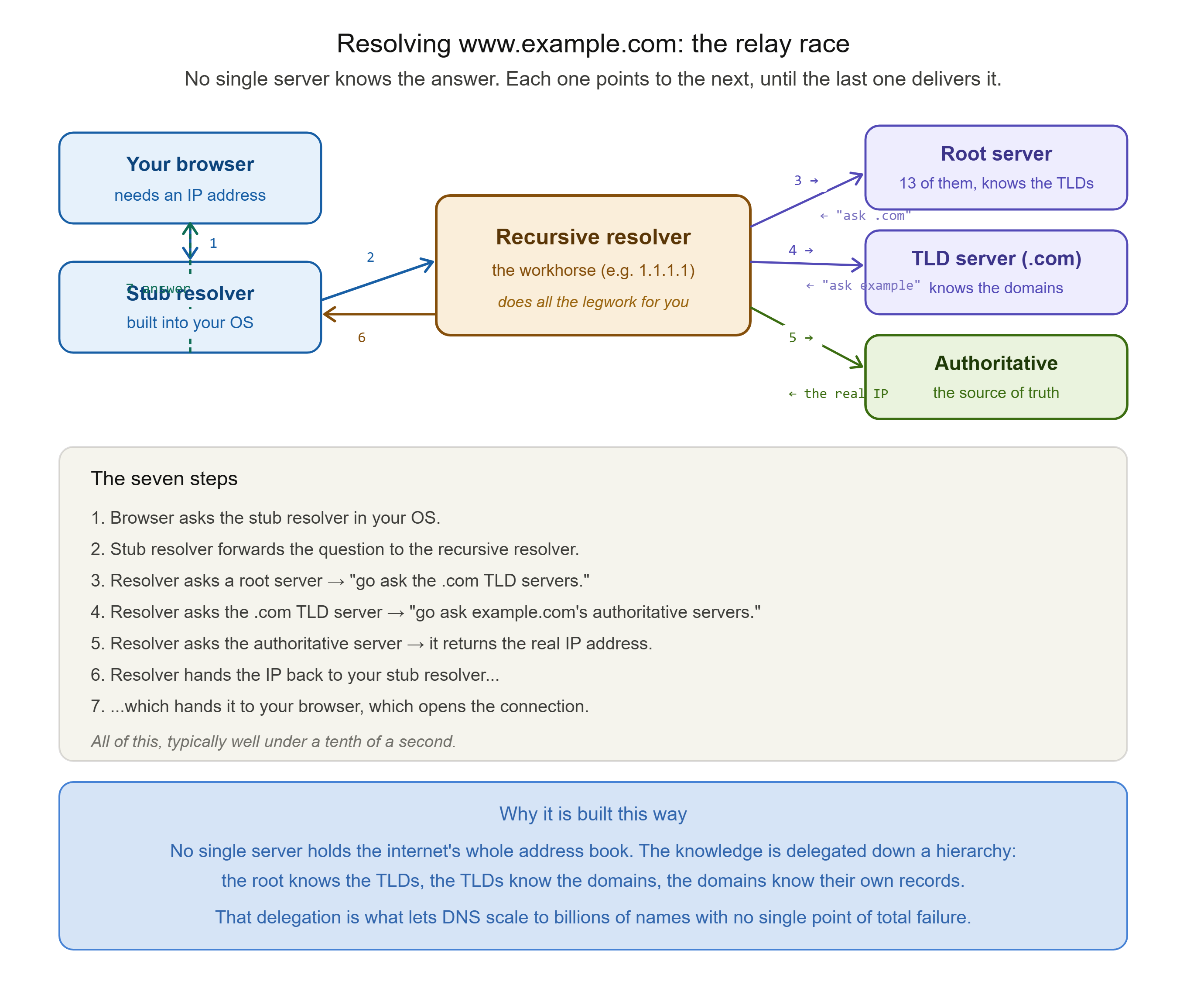
Every one of those steps happened in the time it took the page to start loading, often well under a tenth of a second. A distributed, hierarchical, worldwide system of servers coordinated to answer one question, and you never saw a thing.
Notice the elegant design. No single server holds the whole internet's address book. The knowledge is delegated down a hierarchy: the root knows the TLDs, the TLDs know the domains, the domains know their own records. This is what makes DNS able to scale to billions of names without any one machine being a bottleneck or a single point of total failure.
Caching: Why It Is Not Slow
If DNS did that full seven-step journey every single time, it would be slower and would hammer the root and TLD servers with unimaginable traffic. It does not, because of caching.
At nearly every layer, the answer to a DNS query gets temporarily stored, so it can be reused without repeating the journey. Your browser caches. Your operating system caches. Above all, the recursive resolver caches. When the recursive resolver has recently looked up example.com for someone else, it simply returns the stored answer from its cache, skipping the root, TLD, and authoritative servers entirely. Given how many people share a resolver, most common lookups are answered instantly from cache.
But cached answers cannot live forever, or they would go stale when a domain genuinely changes its address. This is controlled by a value you met back in Post 2: the TTL, or Time to Live. Every DNS record carries a TTL, a number of seconds that says how long this answer may be cached before it must be looked up fresh. A short TTL means changes propagate quickly but caching is less effective. A long TTL means excellent caching but slower propagation when something changes. Every DNS administrator balances these two, and it is why, when you change a website's address, you are often told to wait for the change to propagate. You are waiting for old cached records around the world to hit their TTL and expire.

Keep the security implication of caching in the back of your mind as we move on, because that shared, trusted cache is about to become the target of one of the most important attacks in DNS.
The Records DNS Holds
DNS does not only translate names to IPv4 addresses. A domain's authoritative servers hold several types of records, each serving a different purpose. You do not need to memorise them, but knowing the main ones makes DNS concrete rather than abstract.
The A record is the most fundamental. It maps a name to an IPv4 address. This is the classic phone-book entry: example.com points to 93.184.216.34.
The AAAA record (pronounced "quad-A") does the same job for an IPv6 address. As IPv6 adoption grows, most major domains publish both an A and a AAAA record.
The CNAME record, or Canonical Name, is an alias. It points one name at another name rather than at an address. For example, www.example.com might be a CNAME pointing to example.com, so both resolve to the same place and you only have to maintain the address in one spot.
The MX record, or Mail Exchange, tells the internet where to deliver email for a domain. When you email someone at example.com, the sending mail server does a DNS lookup for example.com's MX record to find the mail server that should receive it.
The NS record, or Nameserver, states which authoritative nameservers are responsible for the domain. It is part of the delegation chain we walked through earlier.
The TXT record holds arbitrary text. It has become the internet's general-purpose noticeboard, used for verifying domain ownership and, importantly, for email security records like SPF, DKIM, and DMARC that help prove an email genuinely came from the domain it claims to.
That last point is worth pausing on. Several of the most important defences against email spoofing and phishing live entirely in DNS TXT records. DNS is not only how you find things, it is increasingly how the internet proves that things are who they say they are, which makes its own trustworthiness all the more critical.
The Security Truth: A System Built to Trust
Here is the thread this whole series keeps pulling, and DNS may be its clearest example yet.
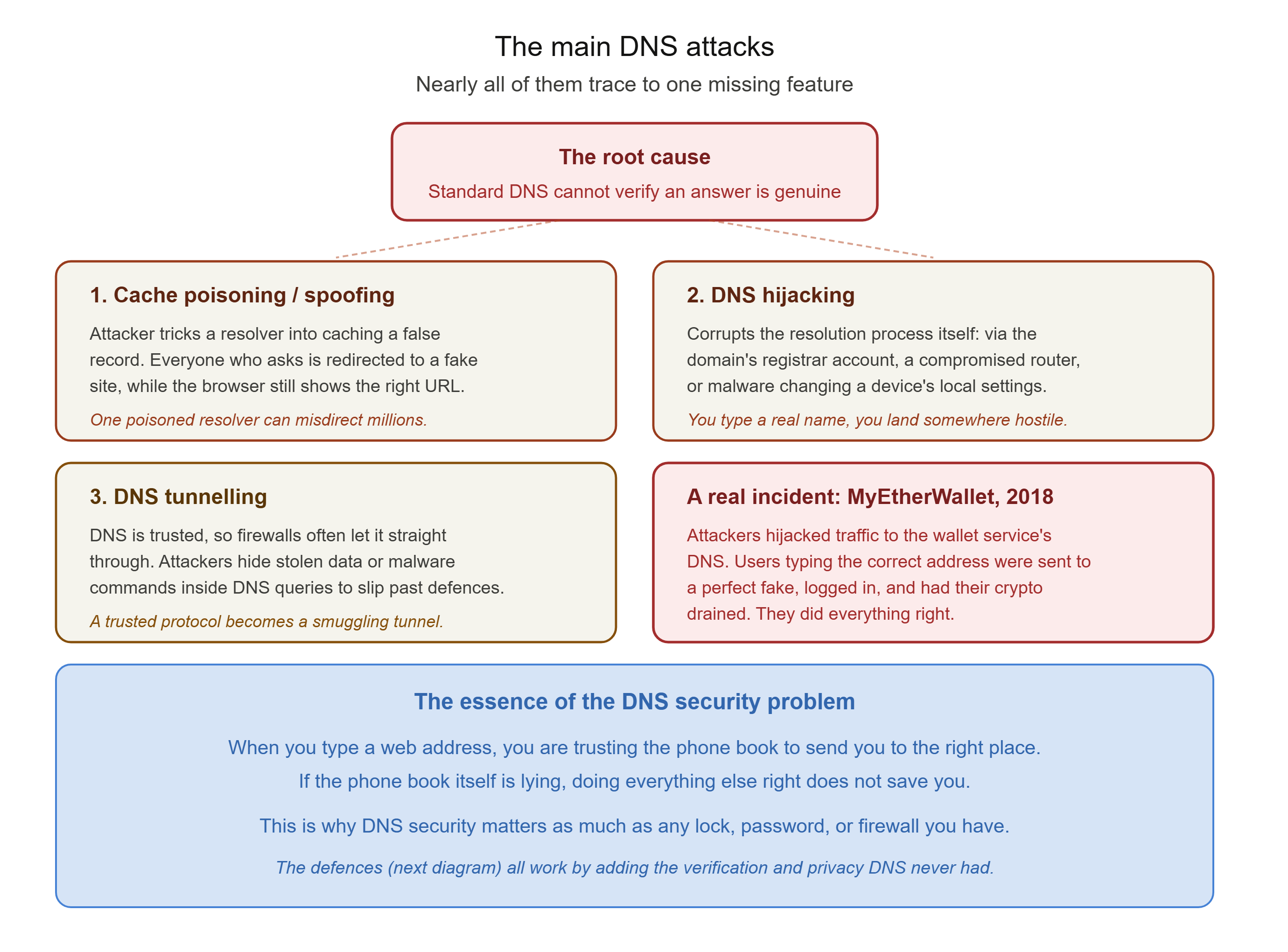
DNS was designed in the early 1980s, for the same small, trusting, academic internet that shaped every other early protocol we have discussed. Its single purpose was to make name resolution work reliably and at scale, and at that it succeeded magnificently. But like the rest of that early internet, it was not built to be secure. The original protocol has no built-in way to verify that a DNS answer is genuine. When a resolver receives a response saying "google.com is at this address," standard DNS has no mechanism to check whether that answer really came from the legitimate authoritative server, or from an attacker who slipped a forged reply in first.
That single missing feature, the inability to verify authenticity, is the root of nearly every DNS attack. Let us look at the main ones.
DNS Spoofing and Cache Poisoning
This is the signature DNS attack, and the caching we just discussed is exactly what makes it so dangerous. In DNS cache poisoning, an attacker tricks a recursive resolver into storing a false record, so that the resolver returns a fraudulent IP address to everyone who asks. Users trying to reach a legitimate site are silently redirected to an attacker-controlled destination, often a convincing fake built to steal credentials, while their browser still shows the correct address in the bar and nothing appears wrong.
The classic technique exploits the trust gap directly: the attacker floods the resolver with forged responses, each guessing at the identifying number that ties a DNS answer to its question, hoping to land a forged reply before the real one arrives. The reason this is so serious is scale. A single poisoned resolver can misdirect thousands or millions of users at once, without touching the target domain's own servers at all. The legitimate site is untouched; the poison is in the directory that points to it.
DNS Hijacking
DNS hijacking is a broader term for any attack that redirects users by corrupting the resolution process itself, rather than poisoning a cache. This can happen several ways. An attacker might compromise the domain's account at its registrar and change its records at the source. They might take over a home or office router and change which resolver it uses, pointing every device on that network at a malicious server. Or malware on a device might alter its local settings so that specific domains resolve to attacker-controlled addresses. In every case, the result is the same: you type a legitimate name, and you are sent somewhere hostile.
DNS as a Smuggling Tunnel
There is a subtler abuse worth knowing about. Because DNS traffic is so essential and so trusted, it is very often allowed straight through firewalls that would block other traffic. Attackers exploit this by using DNS itself as a covert channel, a technique called DNS tunnelling. Data, such as stolen information or commands to malware already inside a network, is smuggled hidden inside DNS queries and responses, slipping past defences that never thought to inspect the humble name lookup. It is a striking example of how a trusted, overlooked protocol becomes an attacker's favourite hiding place.
A Real Incident: The MyEtherWallet Redirect
To make this concrete, consider what happened to users of MyEtherWallet, a popular cryptocurrency wallet service, in 2018. Attackers manipulated internet routing to hijack the traffic headed for the service's DNS infrastructure, so that people typing the correct, legitimate web address were quietly redirected to a malicious copy of the site. The fake site looked right. Users logged in as normal. And in doing so, they handed their credentials straight to the attackers, who drained cryptocurrency from the real accounts. No victim did anything obviously wrong. They typed the correct address. The directory that was supposed to send them to the right place sent them into a trap. That is the essence of why DNS security matters: when the phone book itself is lying, doing everything else right does not save you.
The Defences: Adding Trust to a Trusting System
If the root problem is that DNS cannot verify authenticity, then the defences are all, in one way or another, about adding that missing verification and privacy back on top. There are two main families, and they solve two different problems.
DNSSEC: Proving the Answer Is Genuine
DNSSEC (DNS Security Extensions) addresses the authenticity problem directly. It uses public-key cryptography to digitally sign DNS records, so that a resolver can verify that an answer genuinely came from the legitimate authoritative source and was not forged or tampered with in transit. If a poisoned or spoofed record arrives, its signature will not validate, and a DNSSEC-aware resolver will reject it. This is the primary cryptographic defence against cache poisoning and spoofing.
DNSSEC is powerful, but it is worth being honest about its limits, because this is where many explanations oversell it. First, DNSSEC provides authentication and integrity, proof that the answer is genuine and unaltered, but it does not provide encryption. DNSSEC responses are signed, not secret. Second, its real-world protection is limited by inconsistent deployment. Major top-level domains sign their zones, but signing at the level of individual domains remains patchy, and a signature only helps if both the domain publishes one and the resolver checks it. And third, DNSSEC does not defend against every DNS attack. It does nothing against registrar account compromise, router hijacking, or a malicious entry placed directly in a device's local settings, because in those cases the attacker is not forging a signed record, they are changing the process elsewhere.
DoH and DoT: Encrypting the Conversation
The second family solves a different problem: privacy and tampering in transit. Standard DNS queries travel in plain text, which means anyone positioned along the path, on the same public Wi-Fi, for instance, can see every domain you look up and potentially tamper with the response. This is the postcard problem from Post 2, applied to DNS.
DNS over HTTPS (DoH) and DNS over TLS (DoT) solve this by encrypting the DNS conversation between your device and the resolver. An on-path eavesdropper can no longer read which sites you are looking up, and can no longer secretly modify the answers, because the channel is encrypted and the resolver's identity can be verified. This makes the kind of on-path tampering that public Wi-Fi enables far harder to pull off.
The crucial point, and the honest one, is that these two families are complementary, not interchangeable. DNSSEC proves the answer is genuine but does not hide it. DoH and DoT hide the conversation but do not, by themselves, prove the authoritative answer was genuine. Strong DNS security uses both: encryption to protect the conversation in transit, and signing to prove the answer's authenticity. And because even both together do not cover registrar compromise or router hijacking, real defence also means securing the accounts and devices around DNS, not just the protocol. No single technology closes every path, which is exactly why layered defence is the theme it always comes back to.

Commands to See DNS For Yourself
DNS is one of the most satisfying systems to inspect directly, because every step is visible with the right tool.
The simple lookup, on any system:
nslookup google.com
This asks your configured resolver for the address of google.com and shows you the answer, along with which resolver gave it. Simple and available everywhere.
The detailed lookup, on macOS and Linux:
dig google.com
dig is the tool of choice for anyone serious about DNS. It shows the answer, the record type, and, importantly, the TTL counting down, the caching lifetime we discussed. Run it twice in quick succession and watch the TTL drop, that is the cache at work.
Watch the entire resolution journey happen:
dig +trace google.com
This is the one to try. The +trace option makes dig perform the full walk we described, starting at the root servers, following the referral to the TLD servers, then to the authoritative servers, printing each step. You are watching the relay race in real time, seeing the root hand off to .com, and .com hand off to google.com's own nameservers. Few commands make an abstract concept this tangible.
Look up specific record types:
dig example.com MX      (find the mail servers)
dig example.com TXT     (see the text records, including email security)
dig example.com NS      (see the authoritative nameservers)
Try the MX and TXT lookups on a domain you know. Seeing a real domain's mail configuration and its SPF or DMARC records makes the record types stop being a list and start being real infrastructure you can read.
What You Now Understand
You began with a small mystery, that you navigate the entire internet by name yet the network runs on numbers, and you now understand the system that bridges the two. DNS is the phone book of the internet, the translation layer that lets stable human names point at shifting machine addresses, decoupling the two so each can do its job.
You can trace the resolution journey yourself: the stub resolver in your OS, the recursive resolver doing the legwork, and the hierarchy of root, TLD, and authoritative servers, each knowing just enough to delegate to the next. You understand why this delegated design lets DNS scale to the whole internet, and how caching, governed by TTL, makes it fast. You know the main record types, and the striking fact that DNS is now used not just to find things but to prove identity, through the email-security records living in TXT.
Most importantly, you understand the security truth at the centre of it. DNS was built for a trusting world and cannot, on its own, verify that an answer is genuine. That single gap is the root of spoofing, cache poisoning, and hijacking, made vivid by real incidents where typing the correct address still led users into a trap. And you know the two complementary families of defence: DNSSEC to prove authenticity, DoH and DoT to protect the conversation, with the honest caveat that neither is complete and layered defence is the only real answer.
This is the same lesson the series keeps arriving at from every direction. The foundational systems of the internet were built for connection, not protection, and security has been carefully added on top ever after.
In the next post, we go deeper into how data is actually carried once a name has been resolved and a connection is being made. We will look closely at the two great transport protocols, TCP and UDP, the reliability-versus-speed tradeoff that every application on the internet has to make, and the three-way handshake that quietly opens nearly every connection you use. That is Post 6.
This is Post 5 of the Networking Foundations series. If DNS finally makes sense as more than a vague acronym, share it with someone who has wondered what actually happens when they type a web address. New here? Start with Post 1, and Post 4 on IP addressing leads directly into this one. Subscribe to our newsletter to get each new post as it publishes.
Comments