
You hit send on an email. A second later, it is in your colleague's inbox three hundred miles away.
From your perspective, it felt instant and whole. One message, sent, received. But that is not what actually happened. What you experienced as a single, seamless transfer was, underneath, something closer to controlled chaos. Your email was shredded into dozens or hundreds of small chunks. Each chunk was stamped with an address and sent out individually, sometimes by completely different routes, then reassembled at the other end into something that, by the time it reached the screen, looked exactly like what you wrote.
This is not a workaround or an edge case. This is how all data moves across every network on the planet, all the time, for everything. Understanding this single mechanism, the packet, is the key that unlocks almost everything else in networking.
And the best way to understand it is not through diagrams of computers. It is through something you already understand intuitively: the postal service.
The Postal Service That Never Sleeps
Imagine you need to send a 500-page manuscript to a publisher across the country. You cannot fit 500 pages into one envelope. It would be too thick, too heavy, and if it got lost or damaged in transit, you would lose the entire manuscript at once.
So instead, you do something clever. You split the manuscript into 500 individual pages. You put each page in its own envelope. On each envelope, you write the destination address, your return address, and, most importantly, a page number, so the publisher knows the order to put them back in. Then you post all 500 envelopes.
Here is where it gets interesting. Those 500 envelopes do not all travel together. Some might go via one sorting office, others via a different route, depending on which trucks have space, which roads are open, and which sorting centre is less busy that day. They might arrive at the publisher's office across several hours, in a jumbled, non-sequential order. Page 347 might arrive before page 12.
But because every envelope is numbered, the publisher can simply sort them back into order on arrival. The manuscript is reassembled, complete and correct, even though it never travelled as a single unit, and even though every individual piece took its own independent path.
This is precisely how data travels across a network. The "manuscript" is your email, your webpage, or your video call. The "envelopes" are called packets. And the postal service's sorting offices are the routers that make up the internet.
What Is Actually in a Packet
Let us open one of those envelopes and look closely at what is inside, because the structure matters enormously.
A packet has three parts, and the postal analogy maps onto them almost perfectly.
The first part is the header. This is the envelope's outside, the address information. It contains the source address (where this packet came from), the destination address (where it is going), and additional metadata that helps the network handle it correctly along the way.
The second part is the payload. This is the letter inside the envelope, the actual content. This is the piece of your email, webpage, or video that this particular packet is responsible for carrying.
The third part is the trailer. Not every packet has one, but many do. The trailer is like a seal on the envelope, a small piece of data used to check that the contents were not corrupted or damaged in transit. If the trailer's checksum does not match what is expected, the receiving device knows something went wrong and can discard the packet or request it again.
A network packet, sometimes called a frame at certain layers, is the basic unit of data transfer across networks, containing both the header and the actual data being transmitted. The header is placed at the front of the packet, and it enables the receiving router or switch to know where the packet comes from, what to do with it, and where to send it next.
That is it. That is a packet. A small amount of data, wrapped in addressing information, with an optional integrity check. Everything else in networking, every protocol, every device, every security mechanism, exists to manage how these small wrapped units move, multiply, and get handled correctly at scale.

Encapsulation: The Russian Doll of Data
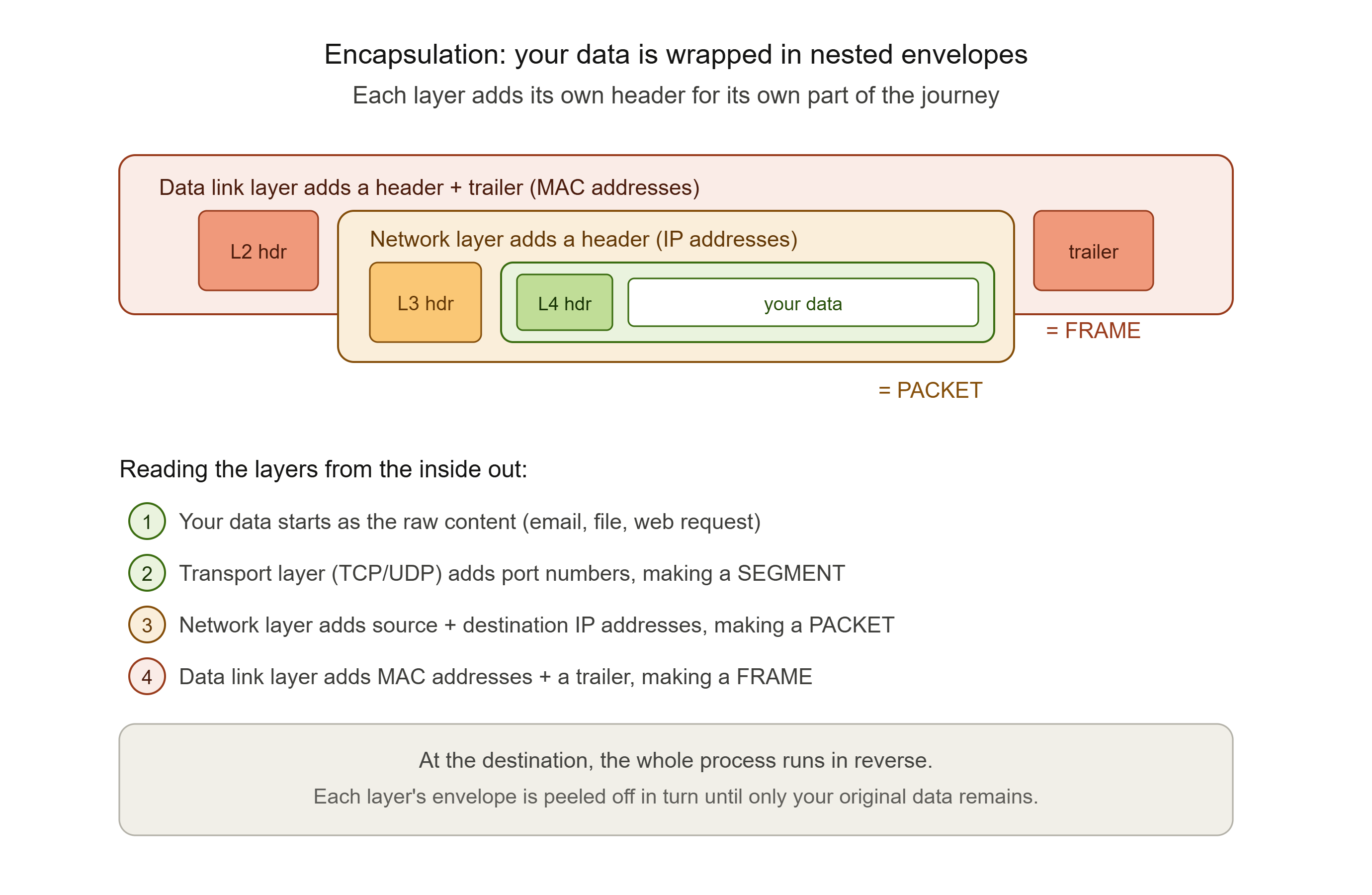
Here is where the postal analogy needs an upgrade, because in real networking, your data does not get put into just one envelope. It gets put into an envelope, which then gets put into another envelope, which then gets put into yet another envelope.
This is called encapsulation, and it happens because different "postal services" are involved at different stages of the journey. Each one needs its own addressing information for its own part of the job. Think of it like sending an international parcel. You put your letter in an envelope addressed to the recipient. That is one layer. Your local post office then puts that envelope into a larger shipping pouch, addressed to the destination country's sorting hub. That is a second layer. The airline then loads that pouch into a cargo container, labelled for a specific flight. That is a third layer.
Each layer exists to serve a different part of the journey. The innermost envelope still has the final destination address, but the outer layers exist to get it through the next leg of the trip.
In real networking, this happens through several layers, and each one has a name worth knowing:
The transport layer (commonly TCP or UDP) takes your data and breaks it into segments. It attaches a header containing port numbers, which is information about which specific application on the destination device should receive this data.
The network layer then takes each segment and wraps it in another header. This one contains the source and destination IP addresses. Once this header is attached, the resulting unit is officially called a packet.
The data link layer wraps that packet in yet another header, and often a trailer too. This one contains MAC addresses, which identify specific physical devices on the local network. At this point, the unit is called a frame.
Each device that handles your data along the way reads only the layer relevant to its job. A switch reads the MAC address layer to forward traffic on the local network. A router reads the IP address layer to forward traffic between networks. Neither of them needs to read the contents of your actual message, and normally, neither of them can. They are reading the outer envelopes, not opening the letter inside. When the data finally arrives at its destination, this entire process runs in reverse. Each layer's header is removed in turn, like peeling back the envelopes one by one, until what is left is the original payload: your email, your webpage, your file.
We will cover the formal model behind these layers, the OSI model, in the next post in this series. For now, the important thing to understand is this. Every piece of data you have ever sent across a network was wrapped in multiple nested envelopes, each one added and removed by a different part of the system, each one serving a different purpose.
How Packets Find Their Way
Let us go back to our 500-page manuscript. How does each individual envelope actually know which route to take? The sender does not choose the route. Neither does the recipient. The routing happens at every sorting office along the way, based on the address on the envelope and the sorting office's own knowledge of the best next step.
This is exactly how routers work. A router does not know the entire path a packet will take from source to destination. It only knows one thing: given this destination address, which of my connections should I send this packet down next? It makes that decision, forwards the packet, and its job for that packet is done. The next router makes its own decision, and so on, until the packet arrives.
This is why two packets that are part of the same email, sent moments apart, can genuinely travel through different cities, different countries, and different physical cables, and still both arrive at the same destination within milliseconds of each other.
There is one more crucial piece of information in every packet's header that is worth understanding: the Time to Live, or TTL.
Imagine if an envelope got stuck in an endless loop between two sorting offices. Office A sends it to Office B because B handles that postcode, but B's records say A handles it, so B sends it back to A, forever. Without something to stop this, that envelope would circulate indefinitely, wasting resources forever.
The TTL field solves this. Every packet starts with a TTL value, commonly somewhere around 64 or 128. Every time a router forwards the packet, it decreases the TTL by one. If the TTL ever reaches zero, the packet is discarded, even if it has not reached its destination yet. This is a critical safeguard: routers decrement the TTL field in IP headers specifically to prevent routing loops from consuming network resources indefinitely.
This small detail, a number ticking down inside every packet's header, is also the basis for one of the most useful diagnostic tools in networking, which we will come back to at the end of this post.

When Packets Get Lost
Now for the part of the postal analogy that everyone has experienced personally. Sometimes, mail gets lost.
Maybe a sorting office mishandles an envelope. Maybe it falls behind a conveyor belt and gets found three weeks later. Maybe it is simply destroyed in transit. Whatever the cause, sometimes envelopes just do not arrive.
The same is true for packets. Across long journeys through congested networks, packets get dropped. They are discarded by overloaded routers, corrupted beyond recovery, or lost to faulty hardware along the way. This is called packet loss, and it is a completely normal, expected part of how networks operate. The question is not whether it happens. The question is what happens next.
This is where one of the cleverest ideas in all of networking comes in: sequence numbers and acknowledgements.
Let us return to our manuscript analogy. Imagine if, alongside numbering every page, the publisher's office sent a postcard back to you for every page they received, saying, "Got page 47, thanks." If you, the sender, kept track of which postcards you had received back, you would know exactly which pages had arrived safely, and which ones had not. If three days passed and you had not received a "got it" postcard for page 112, you would simply put page 112 in a new envelope and send it again.
This is essentially what TCP, the Transmission Control Protocol, does. TCP assigns sequence numbers to outgoing segments, and the receiving device sends back acknowledgements (ACKs) confirming what it has received. TCP uses these acknowledgement mechanisms to inform the sender about the receipt of packets and to request retransmissions of missing ones. Crucially, if the sender does not receive an acknowledgement within an expected timeframe, it assumes the packet was lost and sends it again. Under TCP, a packet is retransmitted by the sender if no acknowledgement has been received during a timeout period, which is typically set as roughly twice the round-trip time between sender and receiver.
This is also how out-of-order delivery gets resolved. Just like page 347 of the manuscript might physically arrive before page 12, packets belonging to the same conversation can arrive at the destination in a different order than they were sent. This happens because they took different routes, encountered different delays, or some were retransmitted after being lost. TCP is designed to handle out-of-order packets. It uses sequence numbers to track the order of incoming packets, buffers them temporarily, and reassembles them in the correct order before handing the completed, ordered data up to the application.
All of this happens completely invisibly to you. You never see "page 347 arrived before page 12, please wait while we reorder." You just see your email arrive, complete and correctly formed, a fraction of a second after you hit send, with an enormous amount of postal-service-style choreography having happened underneath, entirely without your awareness.
The Security Truth: Postcards, Not Sealed Letters
Here is where this post connects to the thread that runs through this entire series.
Go back to our envelope analogy one more time, but this time, imagine that most of the envelopes traveling through the postal system are not actually sealed envelopes at all. They are postcards.
Anyone who works at any sorting office that handles your postcard, anyone along the entire route, can simply turn it over and read what is written on the back. The address information has to be visible for routing to work. But on a postcard, the message is visible too.
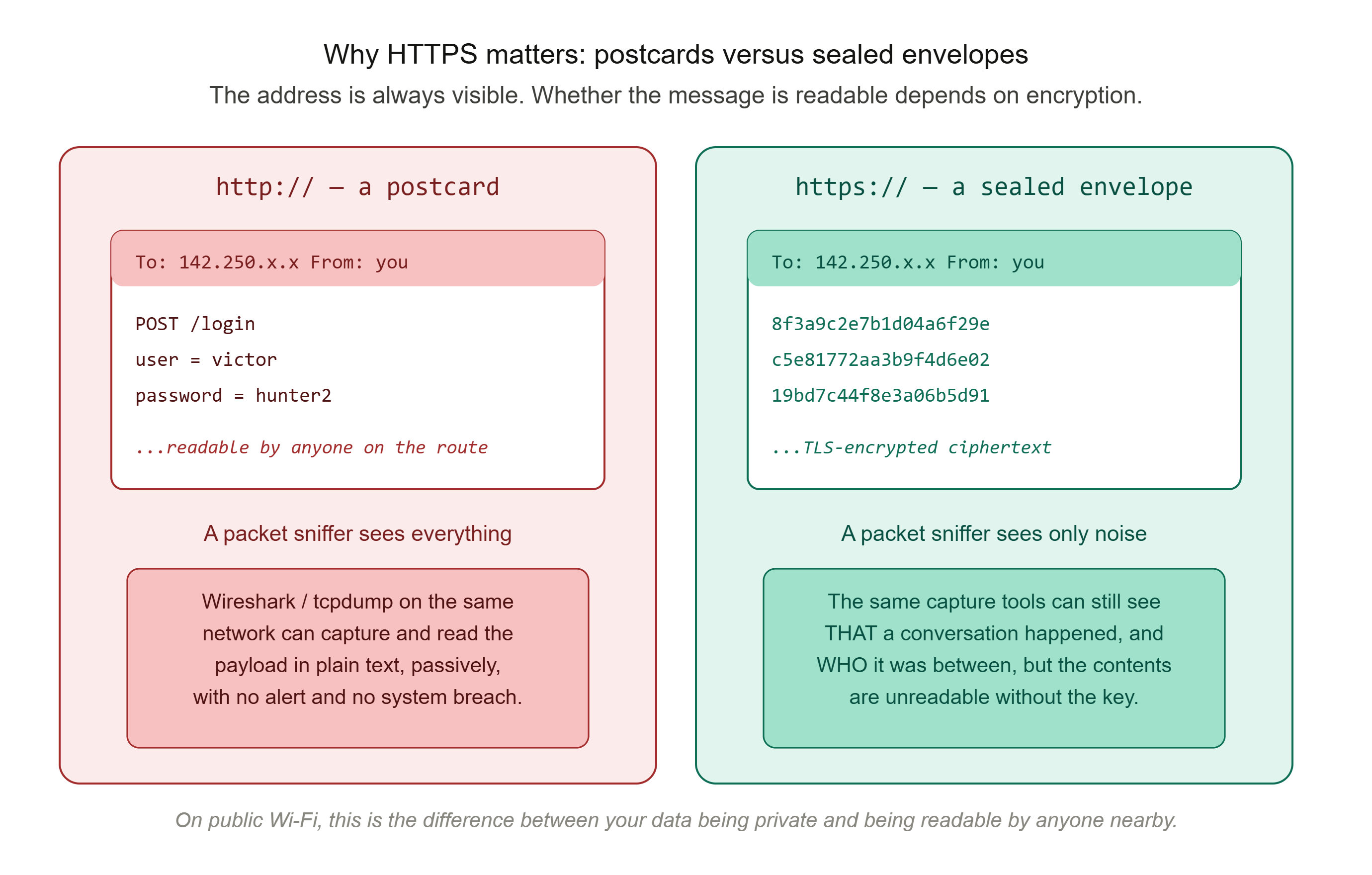
This is the uncomfortable reality of a huge amount of network traffic, even today. Many protocols send their payload, the actual content, completely unencrypted, in plain text, readable by anyone who can see the packet as it passes by.
This is what makes packet sniffing possible. A packet sniffer is software that captures and inspects network traffic as it passes across a network. Tools like Wireshark and tcpdump are the most well-known examples. When traffic is unencrypted, packet sniffers can intercept and read raw data packets, including login credentials and personal messages. Even on networks that feel private, such as your home Wi-Fi, a coffee shop hotspot, or an office network, anyone with access to that network segment and the right software (which is freely available) can potentially see everything traveling across it in plain text.
This is not a theoretical attack requiring exceptional skill. The barrier to entry is remarkably low. An attacker with network access and a laptop can run a sniffer passively without generating any alerts at all, because packet sniffing requires no exploitation of the target system itself. It simply requires visibility of the traffic.
This is precisely why the difference between HTTP and HTTPS matters so much, and it is a difference you can demonstrate to yourself. If you capture traffic to a plain HTTP website with a tool like Wireshark, login form data can appear in the capture as readable plain text. Capture traffic to an HTTPS website performing the exact same login, and the payload is unreadable ciphertext. The TLS encryption that HTTPS provides means a packet sniffer can still see that a conversation is happening, and who it is between, but not what is being said.
This is the difference between a postcard and a sealed, tamper-proof envelope. The address on the front is always visible. That is unavoidable, because routing depends on it. But what is inside does not have to be.
So here is the practical takeaway. Every time you see "https://" rather than "http://" in your browser's address bar, you are looking at the difference between a postcard and a sealed envelope. On public Wi-Fi especially, this distinction is not academic. It is the difference between your data being private and your data being readable by anyone nearby with a free tool and five minutes.
Seeing It For Yourself
Everything in this post is invisible by default, which is exactly why it feels abstract. Here is how to make it visible.

Revisiting traceroute, now with TTL in mind
In Post 1, we ran traceroute (or tracert on Windows) and saw a list of network hops between your device and a destination. Now you know why that tool works the way it does.
traceroute google.com
Traceroute works by sending packets with a deliberately low TTL, starting at 1. That first packet will be discarded by the very first router it reaches, because its TTL hits zero immediately. But that router sends back a small message saying "TTL expired," and that message reveals the router's address. Traceroute then sends another packet with TTL 2, which gets one hop further before expiring, revealing the second router. And so on.
Every line of output from traceroute is, quite literally, a packet that was deliberately sent to die at a specific point in its journey, and the dying packet's last words reveal who stopped it. That is how the tool maps your entire route to a destination, one hop at a time.
Watching packets in real time
If you want to see actual packets, with actual headers and actual payloads, the standard tool is Wireshark, a free and widely-used packet capture and analysis tool. Installing it and capturing even thirty seconds of your own network traffic is genuinely eye-opening. You will see the sheer volume of packets flowing in and out of your device every second, just from background processes, app updates, and idle connections you did not know were active.
If you do try this, do it only on your own network and with appropriate care. Capturing traffic you do not have permission to capture is illegal in most jurisdictions. Look for the protocol column. You will see TCP, UDP, DNS, TLS, and more flying past, each one a small envelope, each one part of a larger conversation, each one finding its own way.
What You Now Understand
You now know that nothing you send across a network travels as a single, whole unit. It travels as a swarm of small, independently-addressed packets. Each one is wrapped in multiple layers of header information, each one potentially takes a different route, and each one is capable of being lost, delayed, or arriving out of order. All of it gets silently and invisibly reassembled into the experience you actually have: instant, whole, and seamless.
You know what is inside a packet, which is the header, the payload, and often a trailer. And you understand encapsulation, the nested-envelope structure that lets different devices handle different parts of the journey without needing to understand the whole thing.
You know how TTL prevents packets from looping forever, and how that same mechanism powers the traceroute tool you ran in the last post.
You know how TCP's sequence numbers and acknowledgements turn an unreliable, lossy, out-of-order delivery system into something that feels perfectly reliable from the outside. And you know that this reliability is a layer of cleverness built on top of an underlying reality that is messy and imperfect by nature.
Most importantly for this series, you know that much of this traffic travels as postcards, not sealed letters. The header has to be visible for routing to work, but the payload does not have to be, and whether it is or is not depends entirely on whether encryption is in use.
In the next post, we formalise all of this. The OSI model is the framework that organises everything we have discussed, including headers, encapsulation, routing, and addressing, into seven distinct layers, each with its own job. Once you understand packets, the OSI model stops being something to memorise and starts being something that simply describes what you already know.
This is Post 2 of the Networking Foundations series. If the postal analogy made packets click for you, share this with someone who still pictures the internet as a single pipe that data flows through. And subscribe to our newsletter to get each new post in the series as it is published.
Comments