
We have climbed a long way up the stack. We gave data a network to travel on, a way to travel in packets, an address to aim for, a name that resolves to that address, and in the last post, a reliable connection to carry it, courtesy of TCP. Every one of those layers exists to support the thing that finally sits on top: the actual conversation between your browser and a website.
That conversation has a language, and its name is HTTP, the Hypertext Transfer Protocol. Every time you load a page, submit a form, watch a video, or use an app that talks to a server, HTTP is the language being spoken underneath. It rides on top of the TCP connection you now understand, and it is the foundation of the entire web.
This post is about that language, in real depth. How a request is actually structured, how a response answers it, the methods and status codes and headers that make it work, and the surprising fact that HTTP remembers nothing about you between requests, which shaped the entire modern web. Then we turn to the single most important upgrade in the web's history: the S in HTTPS. We will see clearly what it protects, why it became universal, and, just as importantly, what it does not protect, because the padlock promises less than most people think.
One note before we begin. This post introduces HTTPS and what it achieves. The deep cryptographic machinery underneath it, the TLS handshake, certificates, and how trust is actually established, is the entire subject of the next post. Here, we cover what the S does. Post 8 covers how.
What HTTP Actually Is
At its heart, HTTP is beautifully simple. It is a request-response protocol. A client, usually your browser, sends a request to a server. The server sends back a response. That is the entire model. Every interaction on the web is some version of this single exchange: ask, and receive an answer.
When you loaded this page, your browser sent an HTTP request to the server asking for the page's content. The server sent back an HTTP response containing the HTML. As your browser read that HTML and found it needed more things, images, stylesheets, fonts, scripts, it sent more requests, one for each resource, and received more responses. A single web page you view is very often the result of dozens of these request-response pairs happening in quick succession.
HTTP is also, by design, human-readable in its classic form. The messages are structured text, which is part of why it became so universal: it was easy to understand, easy to implement, and easy to debug. Let us look at what those messages actually contain, because the structure is the substance.
The Anatomy of a Request
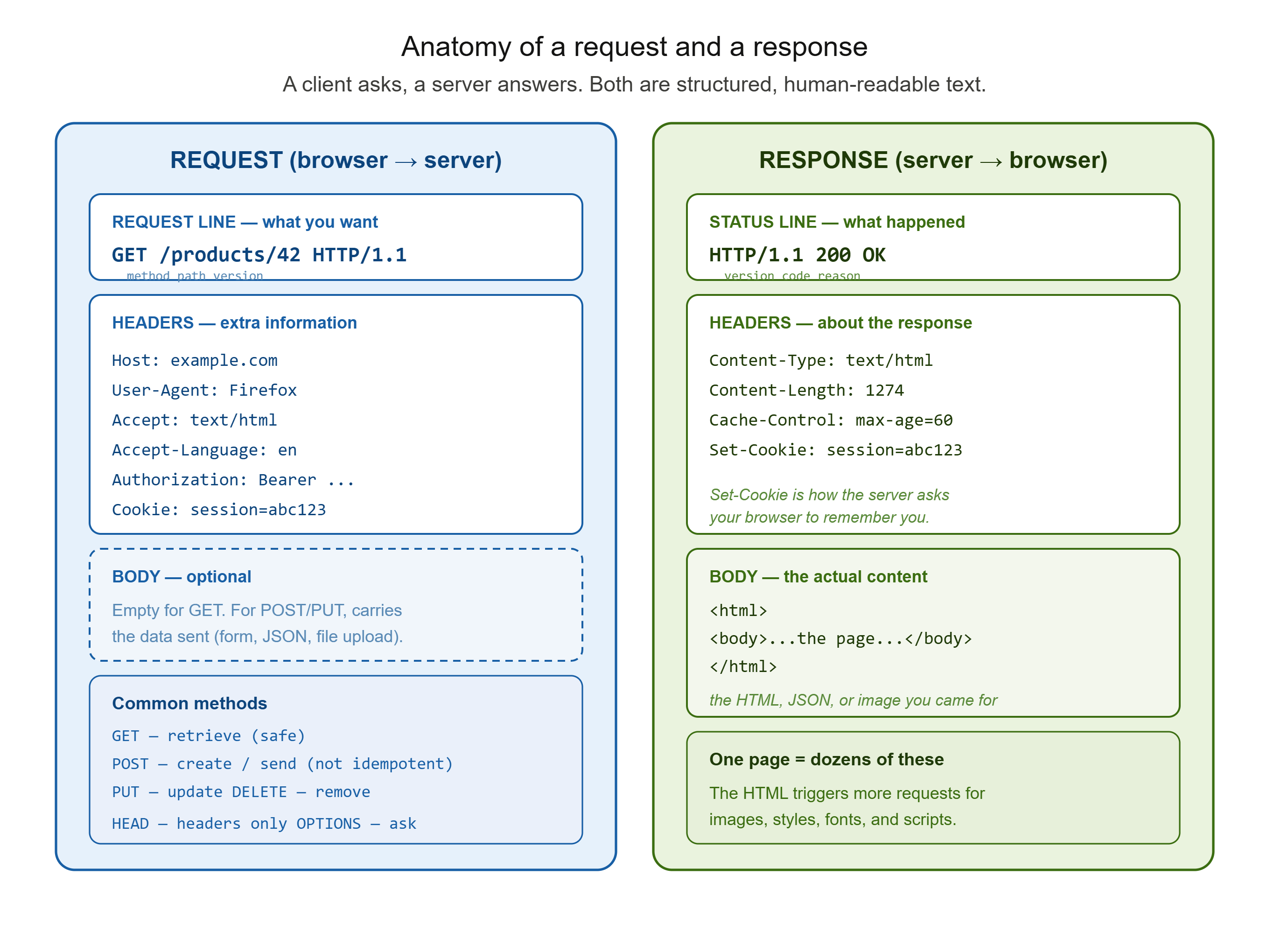
Every HTTP request has three parts: a request line, headers, and an optional body.
The request line states what you want. It contains three things: a method, a path, and the protocol version. It might look like this:
GET /products/42 HTTP/1.1
Here, GET is the method (the action), /products/42 is the path (which resource), and HTTP/1.1 is the version. This one line captures the essence of the request: what action, on what resource.
The method is the verb, and it tells the server what action to perform. There are several, and the main ones are worth knowing:
GET retrieves a resource. It asks the server to send something back, and it should not change anything on the server. Viewing a page or fetching data from an API is a GET. It is the default, and the most common method by far.
POST sends data to the server to create something or trigger an action. Submitting a form, adding an item to a cart, or creating an account is typically a POST.
PUT updates a resource, replacing it with the data you send.
DELETE removes a resource.
HEAD asks only for the headers of a response, not the body, useful for checking something without downloading it.
OPTIONS asks what methods a resource supports.
These methods are classified by two useful properties. Some are safe, meaning they do not modify server state, GET, HEAD, and OPTIONS are safe, because they only read. And some are idempotent, meaning that repeating the request produces the same result as making it once. All safe methods are idempotent, and so are PUT and DELETE, deleting something twice leaves it just as deleted as doing it once. POST is neither safe nor idempotent, which is why submitting a payment form twice can genuinely charge you twice, and why browsers warn you before re-sending a POST.
The headers come next, a set of key-value lines carrying extra information about the request. They are where a huge amount of the web's real work happens. A few important ones: Host names the domain being requested, essential because one server can host many sites. User-Agent identifies the client, whether a browser, a mobile app, or a tool like curl. Accept tells the server what content formats the client can handle. Accept-Language states the user's preferred language. Authorization carries credentials to authenticate the request. And Cookie, which we will come back to shortly, carries stored data back to the server.
The body is optional. For a GET request, there is usually no body, you are only asking for something. For a POST or PUT, the body carries the data being sent, the form contents, the JSON payload, the file being uploaded. The Content-Type header tells the server how to interpret that body, whether it is JSON, form data, or something else.
The Anatomy of a Response
The server's response mirrors the request's structure: a status line, headers, and a body.
The status line reports what happened. It contains the protocol version, a three-digit status code, and a short reason phrase:
HTTP/1.1 200 OK
The 200 is the status code, the machine-readable outcome. The OK is the reason phrase, a human label with no technical significance, which newer versions of HTTP omit entirely.
The status code is one of the most useful things to understand about the web, because it tells you, in three digits, exactly how your request was handled. Codes are grouped into five classes by their first digit:
The 1xx codes are informational, rarely seen directly.
The 2xx codes mean success. 200 OK is the classic, the request worked and here is your content.
The 3xx codes mean redirection, the resource is elsewhere. 301 is a permanent redirect, 304 means "not modified, use your cached copy."
The 4xx codes mean the client made an error. 404 Not Found is the famous one, the server cannot find what you asked for. 403 Forbidden means you are not allowed. And 402 Payment Required, which we met in the web-centralisation interlude, is the status code that sat reserved and unused for three decades because the web never got a native payment layer.
The 5xx codes mean the server failed. 500 Internal Server Error is the general "something broke on our end."
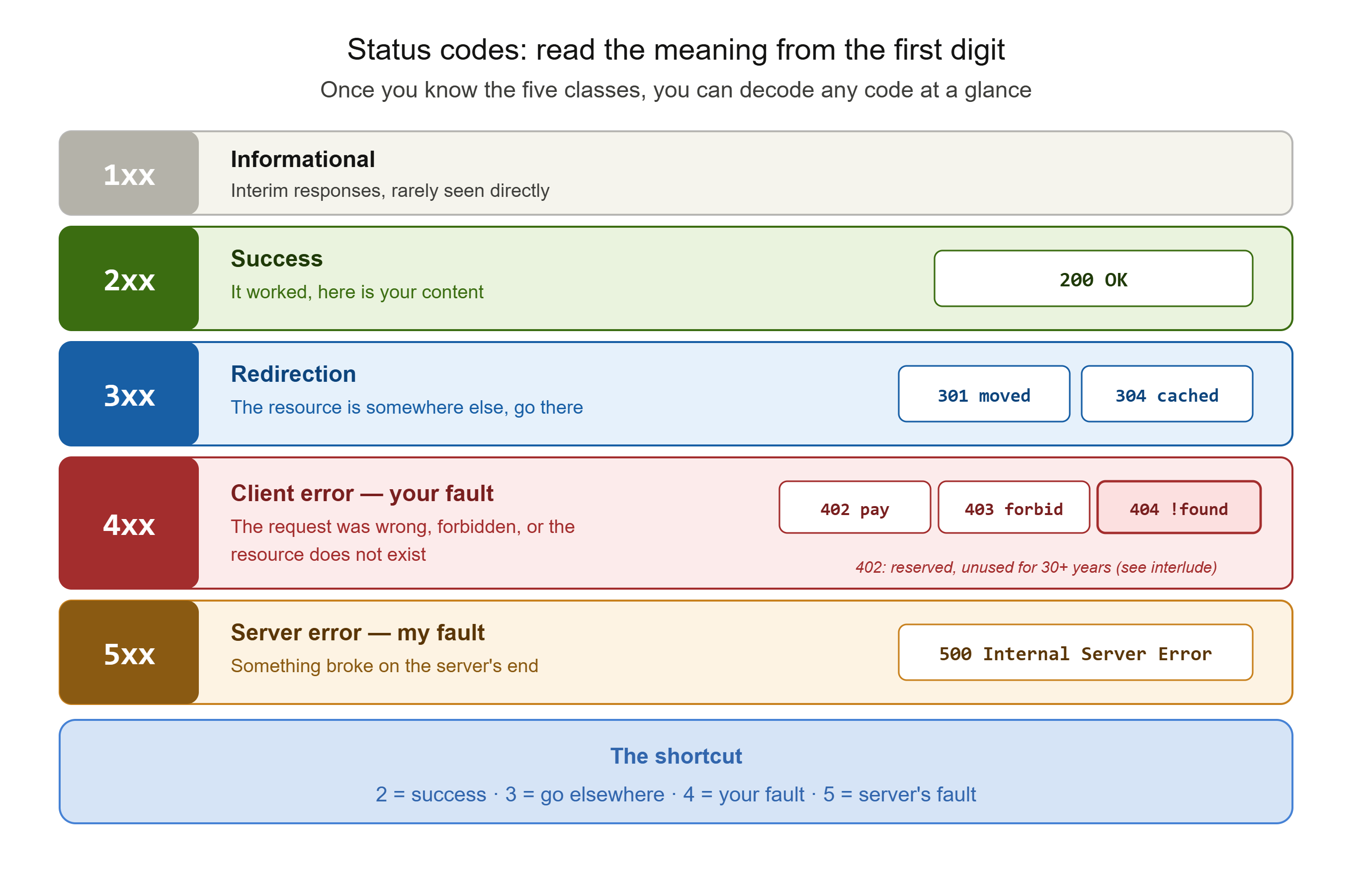
Once you know the five classes, you can read any status code's meaning at a glance: 2 is success, 3 is go elsewhere, 4 is your fault, 5 is my fault.
The headers in the response carry information about what is being sent back. Content-Type states the format of the body, such as text/html or application/json, so the browser knows how to handle it. Content-Length gives its size. Cache-Control tells the browser how long it may reuse this response without asking again. And Set-Cookie, which we are about to discuss, hands the browser a piece of data to store.
The body is the actual content: the HTML of the page, the JSON from the API, the bytes of the image. It is what you came for. Everything else, the status line and headers, is the envelope and the label around it.
The Great Quirk: HTTP Remembers Nothing
Here is a fact about HTTP that shaped the entire web, and it connects directly to the story we told in the web-centralisation interlude.
HTTP is stateless. Each request is completely self-contained and independent. The server, by default, retains no memory whatsoever of any previous request from the same client. Every request arrives as if it were the very first the server had ever seen from you. When you load one page and then click to the next, HTTP itself has no idea those two requests came from the same person.
This statelessness was a deliberate design choice, and a good one. It keeps the protocol simple and lets servers handle enormous numbers of requests without tracking the history of each visitor. But it creates an obvious problem: if the server forgets you between every click, how does a shopping cart remember its contents? How does a site keep you logged in? How does anything that depends on continuity work at all?
The answer is that statefulness had to be built on top of stateless HTTP, and the primary tool for it is the cookie. The mechanism is elegant. When the server wants to remember something about you, it includes a Set-Cookie header in its response, handing your browser a small piece of data. Your browser stores it, and then automatically includes that data in a Cookie header on every subsequent request to that same site. Suddenly the server can recognise you: the cookie you send back carries, for example, a session identifier that lets the server look up who you are and what is in your cart.
This is exactly the point made in the interlude. HTTP left a gap, no memory, no state, and that gap had to be filled. Cookies filled it, and in filling it, they became not just the mechanism for logins and carts but the foundation of the entire tracking and advertising economy, because a thing that can recognise you across requests can also follow you across the web. The modern concepts of sessions and authentication tokens are all refinements of this same idea: carrying state across a protocol that was built to have none.
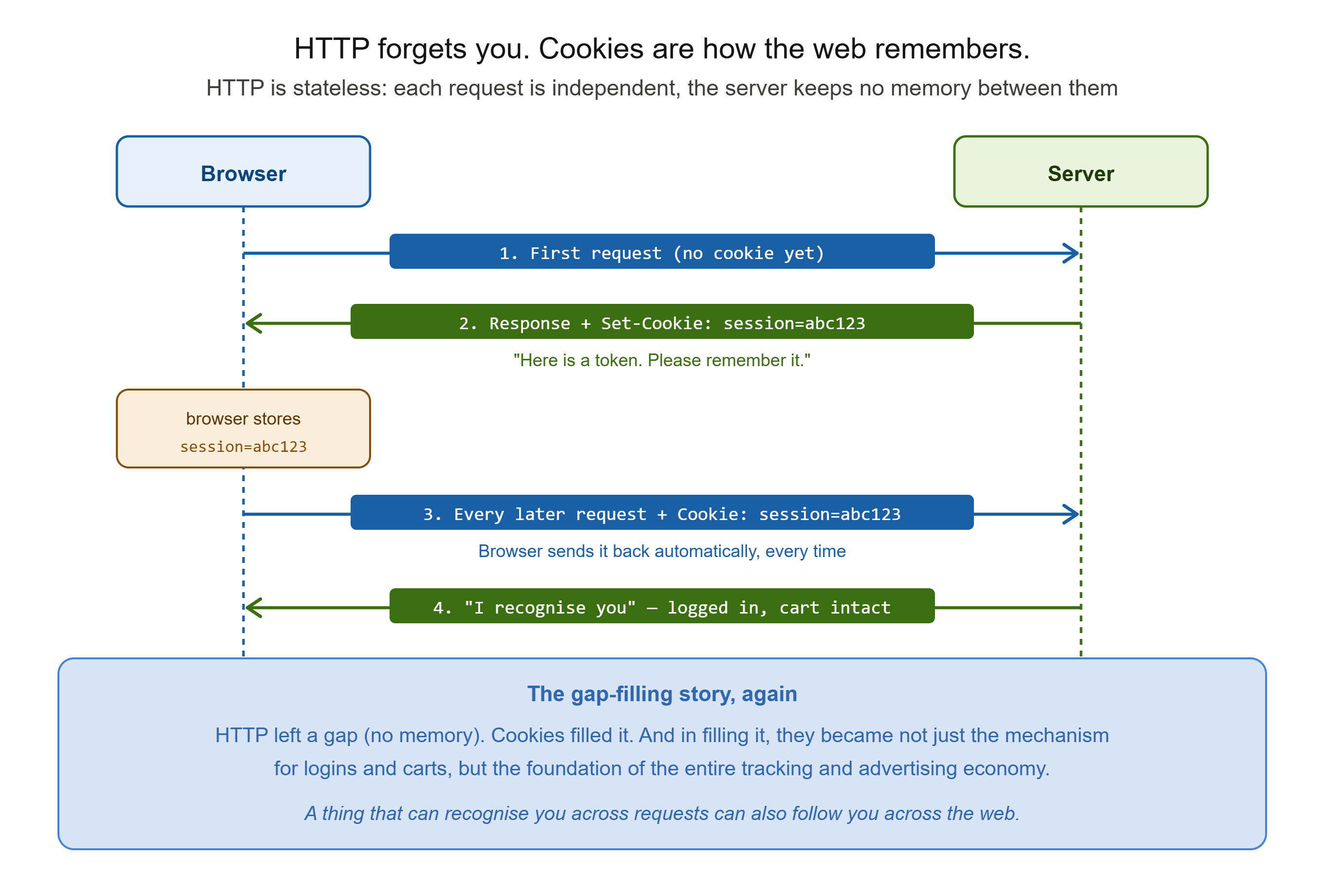
Understanding this one quirk explains an enormous amount about how the web actually works, and why so much of its infrastructure, and so many of its privacy problems, exist.
HTTP's Fatal Flaw: It Travels in the Open
Now we arrive at the problem that the S was invented to solve, and it is a serious one.
Classic HTTP sends everything as plaintext. The request line, the headers, the body, all of it travels across the network as readable text, exactly as written. This includes everything you type into a site over HTTP: your username, your password, your credit card number, the contents of every form. None of it is protected. It is the postcard problem from Post 2, now at the very top of the stack, carrying the most sensitive data of all.
Think about what that means in practice. Between your device and the server, your data passes through many hands: your local router, your internet provider, and every network in between. On plain HTTP, anyone positioned along that path can do three dangerous things. They can read everything you send and receive, capturing passwords and personal data in transit. They can modify it, altering the page you receive or the data you send, injecting content you never asked for. And they can impersonate, pretending to be the site you meant to reach. This is the classic man-in-the-middle attack: someone sitting invisibly between you and the server, reading and altering the conversation.
This was not a theoretical risk. In the era of plain HTTP, using public Wi-Fi at a cafe or airport was genuinely dangerous, because anyone else on that same network could position themselves in the middle and harvest the credentials of everyone around them. The web was, for its first decades, fundamentally insecure by default. Every login and every purchase travelled in the clear unless a site made a special effort otherwise.
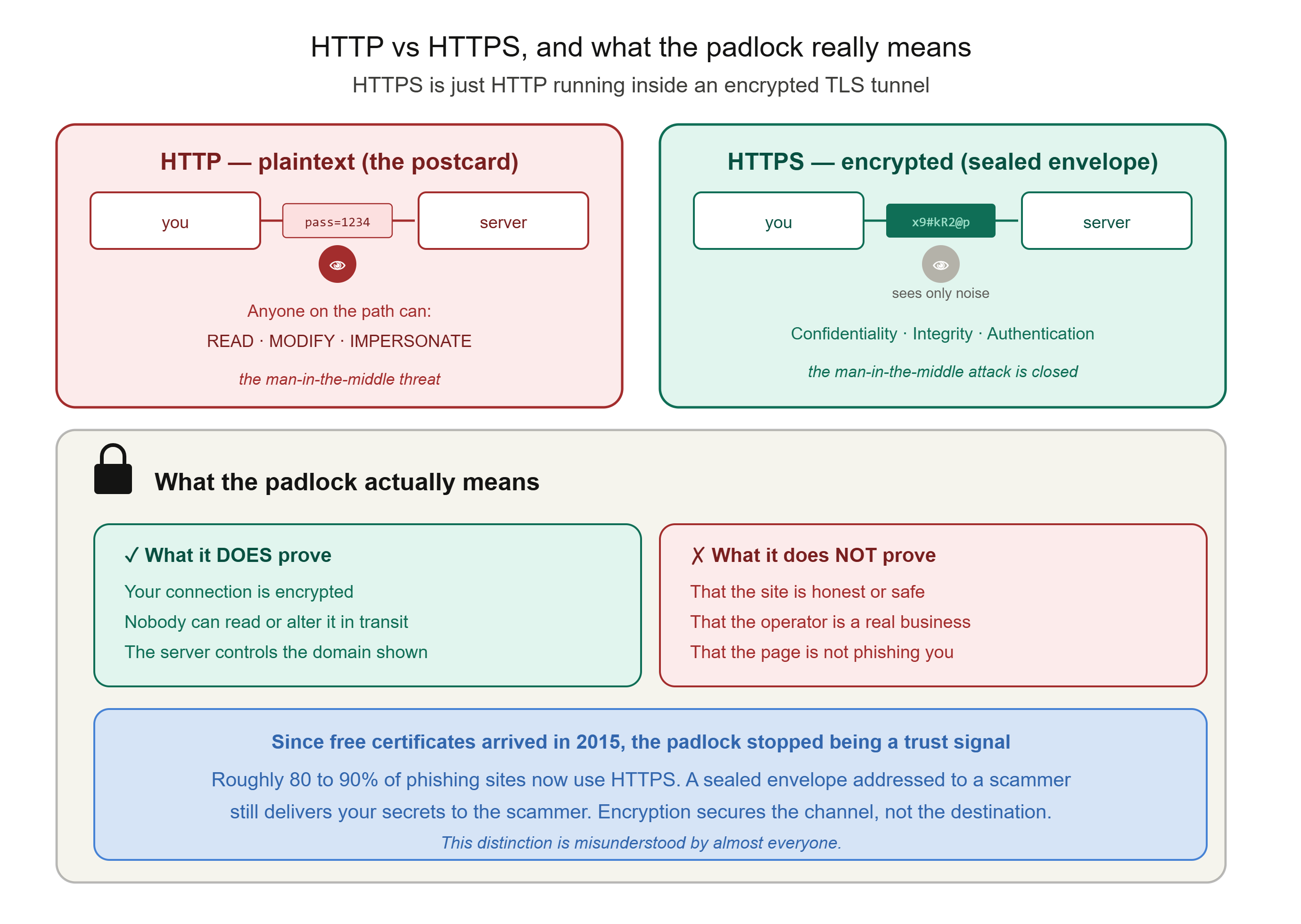
The web needed to seal the envelope. That seal is HTTPS.
HTTPS: What the S Actually Adds
HTTPS stands for HTTP Secure, and the crucial thing to understand is what it actually is: it is ordinary HTTP, exactly as we have described it, running inside an encrypted tunnel. The requests and responses, the methods, the headers, the status codes, all of it is identical. HTTPS simply wraps that entire conversation in a layer of encryption called TLS, Transport Layer Security, so that no one along the path can read or tamper with it.
That encryption provides three distinct protections, and it is worth naming them separately because they are different guarantees.
Confidentiality. The conversation is encrypted, so anyone intercepting it sees only scrambled, unreadable data. Your password, typed over HTTPS, is meaningless to anyone watching the wire. This is the protection people usually think of.
Integrity. The encryption also ensures that if anyone tampers with the data in transit, the change is detected and the connection rejects it. An attacker cannot silently alter the page you receive or the form you submit, because the tampering breaks the cryptographic seal.
Authentication. HTTPS also lets your browser verify that the server it is talking to genuinely controls the domain in the address bar. This is what stops a man-in-the-middle from simply impersonating the site. How this verification actually works, through certificates and certificate authorities, is the subject of the next post, but the guarantee it provides is that you are really connected to the server for the domain shown, and not to an impostor sitting in the middle.
Together, these three, confidentiality, integrity, and authentication, close the man-in-the-middle attack. A listener on public Wi-Fi now sees only encrypted noise. This is why HTTPS went from a rarity, once reserved mainly for login and payment pages, to the default for essentially the entire web. Browsers now actively warn users away from plain HTTP sites, marking them "Not Secure," and the padlock icon appears when a connection is protected by HTTPS. The web sealed its envelopes, at last.
The Honest Part: What the Padlock Does Not Mean
Here is where I want to be carefully honest, because this is one of the most widely misunderstood things in all of web security, and the series' commitment to the real picture demands it.
The padlock in your browser means one specific thing: your connection to that server is encrypted, and the server controls the domain shown in the address bar. That is all it means. It does not mean the website is safe, honest, or trustworthy.
This distinction matters enormously, and attackers exploit the confusion deliberately. A phishing site, a scam shop, a page built purely to steal your login, can have a perfectly valid padlock. HTTPS will faithfully encrypt your data and deliver it securely, in a sealed envelope, straight to the criminal who set up the trap. The encryption works perfectly. It is just protecting a conversation with a thief.
This became a real problem for a specific, almost ironic reason. In the early web, certificates cost money and required some validation, so the padlock loosely correlated with legitimate operators who had spent effort to get one. Then, from 2015, free certificate authorities made certificates instant and free for anyone, which was a genuine and important win for privacy, since it let the whole web encrypt. But it also meant a scammer could get a valid certificate for a fraudulent domain in minutes. The result is that the overwhelming majority of phishing sites today use HTTPS, precisely because users were taught to look for the padlock and trust it. The padlock stopped being a signal of trustworthiness the moment trustworthiness stopped being required to obtain one.
So the accurate mental model is the one this series keeps returning to: HTTPS is a sealed, tamper-proof envelope. It guarantees that what you send arrives unread and unaltered, and that it went to the domain shown. It says nothing whatsoever about whether the person receiving it is honest. Addressing a sealed envelope to a scammer still delivers your secrets to a scammer. Encryption secures the channel. It does not vouch for the destination.
Understanding that line, what the padlock proves and what it does not, is one of the most practically valuable things you can take from this entire series, because it is misunderstood by almost everyone.
Commands to See It Yourself
HTTP's text-based design makes it wonderfully easy to inspect directly.
See a full HTTP request and response, headers and all:
curl -v http://example.com
The -v (verbose) flag shows the entire exchange: the request line and headers your machine sends, marked with >, and the status line and headers the server returns, marked with <. You are reading the raw language of the web, exactly as it goes over the wire.
See just the response headers:
curl -I https://example.com
The -I flag requests only the headers, using a HEAD request. You will see the status line, the Content-Type, Cache-Control, and often Set-Cookie and other headers, without the page body cluttering the view.
Compare HTTP and HTTPS directly:
curl -v https://example.com
Run this against an HTTPS site and, in the verbose output, you will see the TLS negotiation happen before any HTTP is exchanged, the encrypted tunnel being established first, then the ordinary HTTP conversation flowing inside it. That negotiation is the subject of the next post.
Watch your browser do it: open your browser's developer tools and select the Network tab, then load any page. You will see every single HTTP request the page makes, each with its method, status code, and full headers. It is the entire content of this post, visible live on any site you visit.
What You Now Understand
You started at the top of the stack, with the language everything else exists to carry, and you now understand it properly.
You know that HTTP is a request-response protocol: a client asks, a server answers, and a single page is dozens of these exchanges. You can read the anatomy of a request, its method, path, headers, and body, and of a response, its status line, status code, headers, and body. You know the main methods and the difference between safe and idempotent ones, and you can decode any status code from its first digit, 2 success, 3 redirect, 4 your error, 5 server error.
You understand the great quirk that HTTP is stateless, remembering nothing between requests, and how cookies were invented to carry state on top of it, becoming both the foundation of logins and the engine of web tracking, exactly the gap-filling story the interlude described.
And you understand the single most important upgrade in the web's history. Plain HTTP travels as readable plaintext, exposed to reading, tampering, and impersonation by anyone on the path, the man-in-the-middle threat that made the early web insecure by default. HTTPS wraps HTTP in TLS encryption to provide confidentiality, integrity, and authentication, sealing the envelope and closing that attack. But, crucially, you know what the padlock does not promise: it secures the channel, not the site, and a phishing page can wear the padlock as comfortably as a bank can. Encryption protects the conversation. It does not vouch for who you are talking to.
In the next post, we open up that encrypted tunnel and look inside. How does TLS actually work? How do two machines that have never met agree on a secret no eavesdropper can learn? What is a certificate, who issues it, and why does your browser trust them? That is the deep machinery of trust on the internet, and it is Post 8.
This is Post 7 of the Networking Foundations series. If HTTP and HTTPS finally make sense as more than an address-bar detail, share it with someone who has always wondered what the padlock really means. New here? Start with Post 1, and Post 6 on TCP and UDP leads into this one. Subscribe to our newsletter to get each new post as it publishes.
Comments