
If you have ever opened a networking textbook, you have met the OSI model. And there is a good chance you met it like this: a list of seven layers, top to bottom, with a mnemonic to help you remember the order. "Please Do Not Throw Sausage Pizza Away." You memorised it the night before an exam, answered the question, and forgot it within a week.
That is the wrong way to learn the OSI model, and it is the reason so many people who have technically "learned" it still cannot explain what it actually does.
Here is the good news. If you read Post 2 of this series, you already understand the hard part. You have already met packets, headers, encapsulation, IP addresses, and MAC addresses. You watched data get wrapped in nested envelopes, each one added by a different part of the system for a different purpose. The OSI model is simply the formal name for that structure. It is not new information to memorise. It is a label for something you already understand.
So let us not memorise it. Let us recognise it.
The One Diagram That Makes It Click
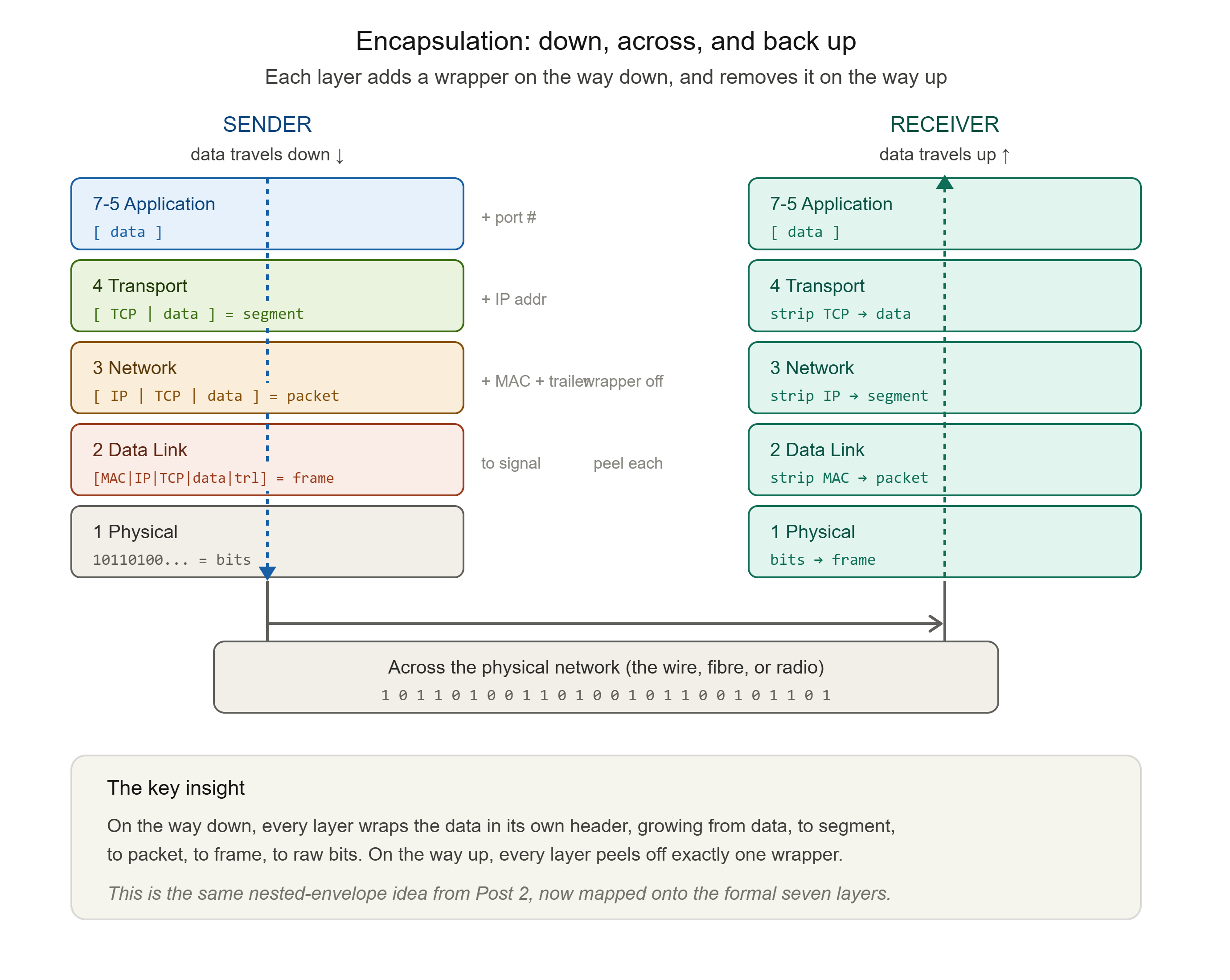
Before we go layer by layer, hold onto one idea from Post 2: encapsulation.
When you send data, it travels down the layers on your device. Each layer wraps the data in its own header (and sometimes a trailer), then hands it to the layer below. By the time it leaves your device as raw signal, it has been wrapped seven times over.
When it arrives at the destination, it travels up the layers. Each layer reads and removes its own wrapper, then hands what is left to the layer above, until the original data emerges at the top, clean and complete.
Data moves down the stack on the sender's side, across the physical network, and back up the stack on the receiver's side. That single motion, down, across, up, is the OSI model in action. Everything else is detail.
The Seven Layers, As Jobs Not Names
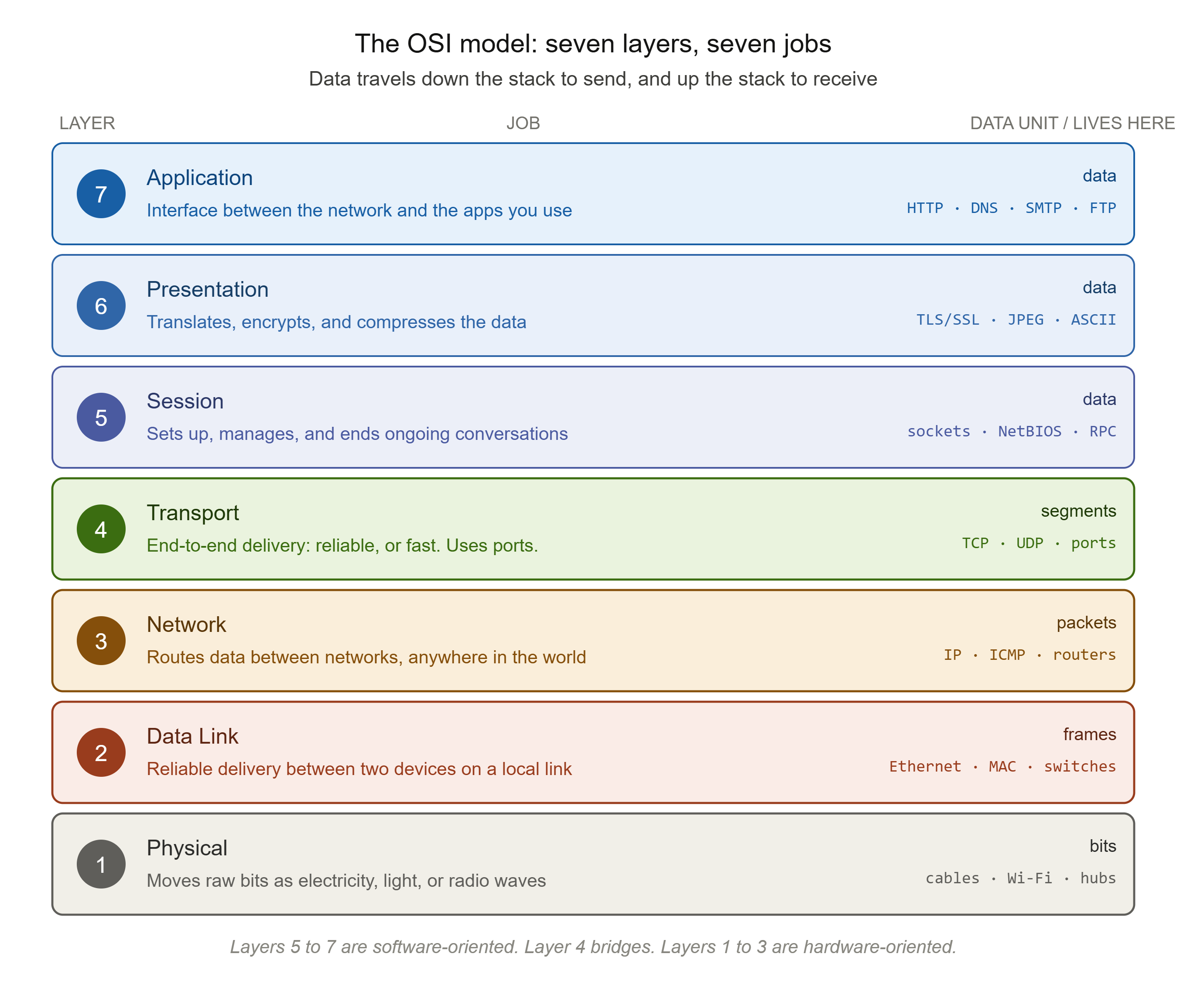
We will go from Layer 1 at the bottom (closest to the physical wire) up to Layer 7 at the top (closest to you, the user). For each layer, here is its job, what lives there in the real world, and the security threats that specifically target it.
Layer 1: The Physical Layer
The job: Move raw bits, the literal 1s and 0s, across a physical medium. This layer is concerned with turning data into electrical signals, pulses of light, or radio waves, and transmitting them from one device to the next.
The physical layer handles all network communication at the bit level. It is responsible for the physical connection between devices, and it defines the hardware elements involved: cables, the electrical or optical or radio characteristics of the signal, and the timing that keeps sender and receiver in sync. When you are troubleshooting a network and someone says "check the cable," they are telling you to check Layer 1.
Data unit: bits.
What lives here: Ethernet cables, fibre optic cables, Wi-Fi radio signals, hubs, repeaters, modems, and network interface cards at the electrical level.
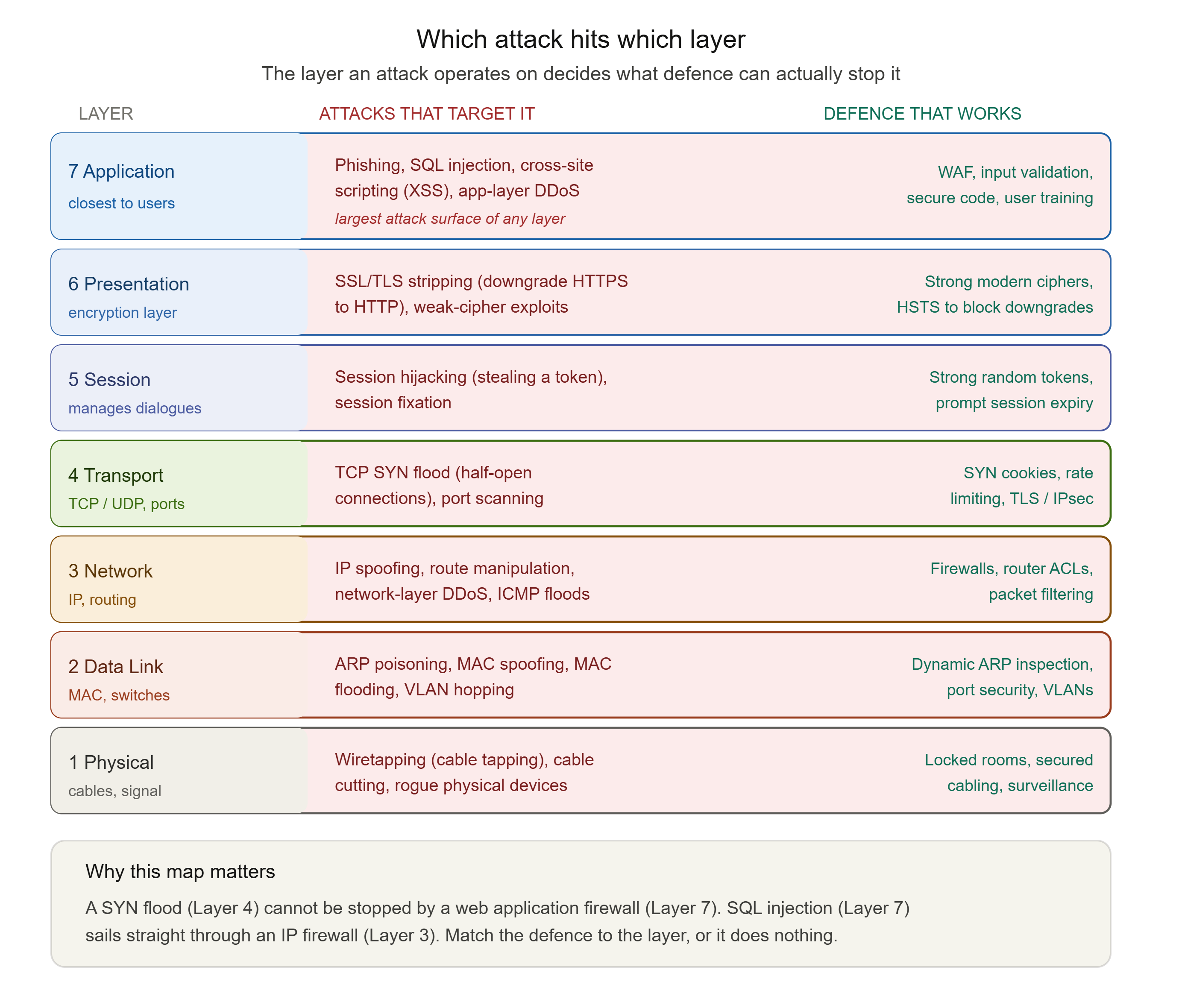
Security at this layer: Physical layer attacks involve hardware tampering and physical access. The classic example is wiretapping: physically tapping into a cable to intercept the signal travelling through it. Other threats include cable cutting (a denial of service through brute physical destruction) and the installation of rogue physical devices. The defences are equally physical: locked server rooms, secured cabling, surveillance, and physical access controls. No amount of clever software protects you if an attacker can walk up and splice your cable.
Layer 2: The Data Link Layer
The job: Take the raw bit-transmission ability of Layer 1 and turn it into reliable communication between two directly connected devices on the same local network. This layer packages bits into frames and uses physical hardware addresses, called MAC addresses, to make sure data reaches the correct device on the local segment.
This is the layer where MAC addresses live, the ones you met in Post 2. The data link layer breaks data into frames for transmission and includes mechanisms for detecting errors that may have occurred at the physical layer.
Data unit: frames.
What lives here: switches, the Ethernet protocol, MAC addresses, and Wi-Fi at the data-framing level.
Security at this layer: This is one of the most actively attacked layers on a local network, and the attacks are worth knowing by name. In MAC spoofing, a device changes its MAC address to impersonate a legitimate device on the network. In ARP spoofing (also called ARP poisoning), an attacker sends forged ARP messages to link their own MAC address with the IP address of a legitimate device, quietly redirecting that device's traffic to the attacker's machine. This is the foundation of most man-in-the-middle attacks on a local network. In MAC flooding, an attacker overwhelms a switch's address table with fake MAC addresses, forcing the switch to fail open and broadcast all traffic to every port, which lets the attacker capture traffic that was never meant for them. Defences include port security on switches, dynamic ARP inspection, and VLAN segmentation.
Layer 3: The Network Layer
The job: Get data from one network to another, anywhere in the world. While Layer 2 handles communication on the local segment, Layer 3 handles the global journey: logical addressing with IP addresses, and routing the data across multiple interconnected networks to reach a destination that may be thousands of miles away.
This is the layer of IP addresses and routers, and it is where the packet (the term you met in Post 2) officially lives. Within Layer 3, the protocol data unit is the packet. The IPv4 header at this layer contains the source address, the destination address, the protocol, and the Time to Live (TTL) value, exactly the TTL countdown we used to explain traceroute in the last post.
Data unit: packets.
What lives here: routers, the IP protocol (both IPv4 and IPv6), and ICMP (the protocol behind ping and traceroute).
Security at this layer: The signature attack here is IP spoofing, where an attacker forges the source IP address in a packet to masquerade as a trusted device or to hide their identity. Layer 3 is also where many Distributed Denial of Service (DDoS) attacks operate, overwhelming a target with a flood of traffic, and where route manipulation attacks alter routing tables to redirect or intercept traffic. Defences at this layer include firewalls, router access control lists (ACLs), and packet filtering, the very mechanisms we explored in the firewall post earlier in this blog.
Layer 4: The Transport Layer
The job: Manage the end-to-end delivery of data between two applications, including reliability, ordering, and the splitting of data into manageable segments. This is the layer that decides how data gets delivered: reliably and in order, or quickly and without guarantees.
The transport layer sits at the boundary between the lower hardware-oriented layers and the upper software-oriented layers. It is the home of the two protocols you will meet in depth in Post 6: TCP, which provides reliable, ordered, acknowledged delivery (the sequence numbers and retransmissions from Post 2 live here), and UDP, which provides fast, lightweight delivery without those guarantees. This layer uses port numbers to make sure data reaches the correct application on the destination device, not just the correct device.
Data unit: segments (for TCP) or datagrams (for UDP).
What lives here: TCP, UDP, and port numbers.
Security at this layer: The classic transport-layer attack is the TCP SYN flood. Recall that TCP opens a connection with a three-way handshake: SYN, then SYN-ACK, then ACK. In a SYN flood, the attacker sends a massive volume of SYN packets, often with spoofed source IPs, but never completes the handshake. The server sets aside memory for each half-open connection and waits. With enough of these, the server's resources are exhausted and it begins refusing legitimate connections. This is a common way to initiate a denial of service. Port scanning also operates here, as attackers probe which ports are open to map out the attack surface. Defences include SYN cookies, rate limiting, and the encryption protocols TLS and IPsec.
Layer 5: The Session Layer
The job: Establish, manage, and cleanly terminate the ongoing conversations (sessions) between two applications. If two systems need to hold a sustained dialogue rather than exchange a single message, this layer sets up that session, keeps it organised, and tears it down when finished.
Think of the session layer as the part of the system that remembers a conversation is ongoing: that you are logged in, that this exchange is part of a larger whole, and where to resume if something is interrupted.
Data unit: data.
What lives here: session management protocols, and aspects of technologies like NetBIOS and RPC. Authentication and reconnection logic often operate at this conceptual level.
Security at this layer: The signature threat is session hijacking, where an attacker takes over a legitimate, authenticated session, often by stealing or forging the session token that proves who you are. Session fixation, where an attacker forces a victim to use a known session ID, is a related attack. Because sessions are how systems remember that you are authenticated, stealing a session can be as good as stealing a password. Defences include strong, random session tokens, binding sessions to other attributes, and timely session expiry.
Layer 6: The Presentation Layer
The job: Translate, format, encrypt, and compress data so that the application layer above can understand it regardless of how it was sent. This layer is the translator: it makes sure that data sent by one system is presented in a form the receiving system can actually use.
This is the layer most associated with encryption and decryption, character encoding (such as how text is represented), and data compression. When data is encrypted for transit, that transformation conceptually happens here.
Data unit: data.
What lives here: encryption standards, TLS/SSL (which spans this area conceptually), character encodings like ASCII and Unicode, and compression and file formats like JPEG and PNG.
Security at this layer: Because this is the encryption layer, it is the target of attacks aimed at undermining encryption. SSL/TLS stripping is the key example: an attacker downgrades a secure HTTPS connection to plain, readable HTTP, turning the sealed envelope from Post 2 back into a postcard. Attacks that exploit weak or outdated encryption algorithms also belong here. The defence is to enforce strong, current encryption and to use mechanisms (like HSTS) that refuse to allow a secure connection to be downgraded.
Layer 7: The Application Layer
The job: Provide the interface between the network and the actual applications and users. This is the layer closest to you. It is not the application itself (your browser, your email client), but the protocols those applications use to interact with the network.
The application layer is the human-to-computer interaction layer, where applications access network services. When you load a web page, send an email, or resolve a domain name, you are using application-layer protocols.
Data unit: data (often called messages).
What lives here: HTTP and HTTPS (web), SMTP (email), FTP (file transfer), DNS (domain name resolution), and many more. These are the protocols we will spend Post 8 exploring in detail.
Security at this layer: This is the layer closest to users, and therefore the layer where human-facing and software-facing attacks concentrate. Phishing manipulates user behaviour at this layer. SQL injection inserts malicious database commands through application input fields. Cross-site scripting (XSS) injects malicious scripts into web applications to run in victims' browsers. Application-layer DDoS attacks overwhelm a service with seemingly legitimate requests. Because Layer 7 is where the most complex, human-facing logic lives, it has the largest and most varied attack surface of any layer. Defences include web application firewalls, input validation, secure coding practices, and user awareness training.
The Honest Part: OSI vs TCP/IP
Here is something many tutorials gloss over, and it matters: the seven-layer OSI model is not actually what the internet runs on.
The OSI model is primarily a teaching and reference model. It is theoretical in nature and is best used as a general guide, because few real network products keep their functions neatly separated into seven distinct layers. The model that the internet actually runs on is older and simpler: the TCP/IP model, developed by the US Department of Defense before OSI existed.
The key difference is that TCP/IP collapses several OSI layers together into a simpler, more practical structure. Here is how the two line up:
| OSI Model (7 layers) | TCP/IP Model (4 layers) |
|---|---|
| 7. Application | Application |
| 6. Presentation | Application |
| 5. Session | Application |
| 4. Transport | Transport |
| 3. Network | Internet |
| 2. Data Link | Network Access (Link) |
| 1. Physical | Network Access (Link) |

In TCP/IP, the top three OSI layers (application, presentation, session) are combined into a single Application layer. The transport layer stays as its own layer. The OSI network layer becomes the Internet layer. And the bottom two OSI layers (data link and physical) are combined into a single Network Access layer.
So why learn OSI at all, if TCP/IP is what actually runs? Because OSI is the better teaching tool. Its seven layers separate concerns more finely, which makes it far easier to reason about where a problem or an attack sits. When a security professional says an attack is "a Layer 7 attack" or "a Layer 3 attack," they are using OSI numbering, because it is more precise. You think in OSI; the machines run TCP/IP. Both statements are true at once, and a real practitioner is comfortable moving between them.
Even TCP/IP, the most widely used network protocol suite, does not map perfectly onto OSI. The mapping above is a useful approximation, not a law of physics. Hold it loosely.
The Security Payoff: Knowing Which Layer You Are Defending
Here is why all of this matters beyond passing an exam.
When you understand the layers, you understand where in the stack any given attack operates, and therefore what kind of defence can possibly stop it. This is one of the most useful mental tools in all of security.
A SYN flood is a Layer 4 attack. No amount of physical security (Layer 1) or web application firewall rules (Layer 7) will stop it, because it operates at the transport layer. You need a transport-layer defence: SYN cookies, rate limiting.
ARP poisoning is a Layer 2 attack. It happens on your local network segment, below the level a traditional IP firewall even looks. You need a Layer 2 defence: dynamic ARP inspection, port security.
SQL injection is a Layer 7 attack. Your firewall will happily pass it, because to the network it looks like perfectly legitimate web traffic. Only a Layer 7 defence, input validation, a web application firewall, secure code, can catch it.
This is also why the firewall post earlier in this blog matters here. Different firewalls operate at different layers. A traditional packet-filtering firewall works at Layers 3 and 4. A next-generation firewall with deep packet inspection reaches up to Layer 7. Knowing the layers tells you exactly what a given firewall can and cannot see, which is the difference between thinking you are protected and actually being protected.
When you can place an attack on a layer, you stop guessing and start reasoning. That single skill is worth more than any mnemonic.
Commands to See the Layers in Action
You can observe different layers directly from your own machine.
Layer 2 (Data Link), view your MAC address and local ARP table:
arp -a
This shows the ARP table: the mapping of IP addresses to MAC addresses your device currently knows about on the local network. This is exactly the table that ARP spoofing attacks poison. Look at it and you are looking at Layer 2 and Layer 3 meeting.
Layer 3 (Network), see your IP configuration and test routing:
ping google.com
traceroute google.com
(tracert on Windows.) Ping uses ICMP, a Layer 3 protocol. Traceroute, as we covered in Post 2, exploits the Layer 3 TTL field to map your route hop by hop.
Layer 4 (Transport), see active connections and their ports:
netstat -an
or on modern Linux:
ss -tuln
This shows active network connections and the ports they are using. Every line is a Layer 4 conversation, with its TCP or UDP port numbers visible. You are seeing the transport layer at work.
Layer 7 (Application), watch a protocol resolve a name:
nslookup google.com
This uses DNS, a Layer 7 protocol, to translate a domain name into an IP address, the exact subject of the next post in this series.
What You Now Understand
You did not memorise seven words in order. You understand seven jobs.
You know that the OSI model exists because the early networking world was a chaos of incompatible systems, and the industry needed a shared reference so that any vendor's equipment could work with any other's. You know that the model divides communication into seven layers, each with one job, each serving the layer above and below, and that this separation of concerns is the entire point.
You can now place the concepts from Post 2 onto specific layers: bits at Layer 1, frames and MAC addresses at Layer 2, packets and IP addresses and TTL at Layer 3, segments and ports and TCP's reliability at Layer 4. And you know the security threat that targets each layer, from physical wiretapping at the bottom to phishing and SQL injection at the top.
You know the honest truth that the internet actually runs on the simpler four-layer TCP/IP model, that OSI is the superior teaching and reasoning tool, and that a real practitioner moves comfortably between the two.
Most importantly, you have gained the single most useful security habit the OSI model offers: the ability to ask "which layer does this attack operate on?" and, from the answer, to know what kind of defence can actually stop it.
In the next post, we zoom all the way into Layer 3 and the thing that makes global routing possible in the first place: the IP address. We will cover IPv4 and IPv6, public versus private addressing, and subnetting, explained without the maths-first approach that makes most people give up. Once you understand addressing, the network layer stops being abstract and starts being something you can read at a glance.
This is Post 3 of the Networking Foundations series. If this finally made the OSI model make sense, share it with someone still trying to memorise "Please Do Not Throw Sausage Pizza Away." New to the series? Start with Post 1 (what a network actually is) and Post 2 (how data travels) so the concepts build in order. And subscribe to our newsletter to get each new post as it publishes.
Comments