
At the end of the last post, we were standing on dangerous ground: the untrusted local network. The coffee-shop Wi-Fi where a rogue DHCP server might hand you a poisoned configuration, or an ARP-poisoning attacker might quietly slip into the middle of your connection. The obvious question is, what do you do about it? And the answer almost everyone reaches for, the tool marketed relentlessly as the solution to exactly this, is a VPN.
VPNs are among the most heavily advertised products in all of technology, and also among the most misunderstood. The marketing promises privacy, anonymity, security, and freedom, often all at once, usually over footage of someone looking relieved. The reality is more precise and, honestly, more useful to understand. A VPN is a genuinely valuable tool that does a specific set of things very well, and a specific set of other things not at all, despite what the adverts imply.
This post, in keeping with the spirit of the series, gives you the honest, complete picture. What a VPN actually is, beneath the marketing. What tunnelling really means. What a VPN genuinely protects you from, which is real and worth having. And, given equal weight, what it does not do, which is the half that sells subscriptions by staying unsaid. By the end, you will understand VPNs better than most people who use one every day.
What a VPN Actually Is
Strip away the marketing and a VPN, a Virtual Private Network, is something quite concrete. It creates an encrypted tunnel between your device and a server operated by the VPN provider. Instead of your traffic going straight out to the internet from wherever you are, it first travels, encrypted, through this tunnel to the VPN's server. From there, the VPN server passes your traffic on to its actual destination on the internet, and relays the responses back to you through the same tunnel.
That rerouting has two immediate and important consequences, and almost everything about VPNs follows from these two facts.
First, whoever is near you on the local network can no longer see what you are doing. Your traffic enters the tunnel encrypted the moment it leaves your device. So the coffee-shop network, your internet service provider, the ARP-poisoning attacker from the last post, all of them now see only encrypted tunnel traffic flowing to the VPN server. They cannot read it, and they cannot tell what sites you are visiting. The local snoop is blinded.
Second, the websites you visit no longer see your address. They see the VPN server's. Because your traffic emerges onto the wider internet from the VPN provider's server, the destination website logs the provider's IP address, not yours. To the outside world, you appear to be wherever the VPN server is. This is what hides your IP, and what lets a VPN make it look as though you are browsing from another country.
That is the whole mechanism. An encrypted tunnel to a server that then speaks to the internet on your behalf. Everything a VPN does, and does not do, comes from this one arrangement. But to really understand it, we need to look at the word doing the heavy lifting: tunnel.
What Tunnelling Really Means
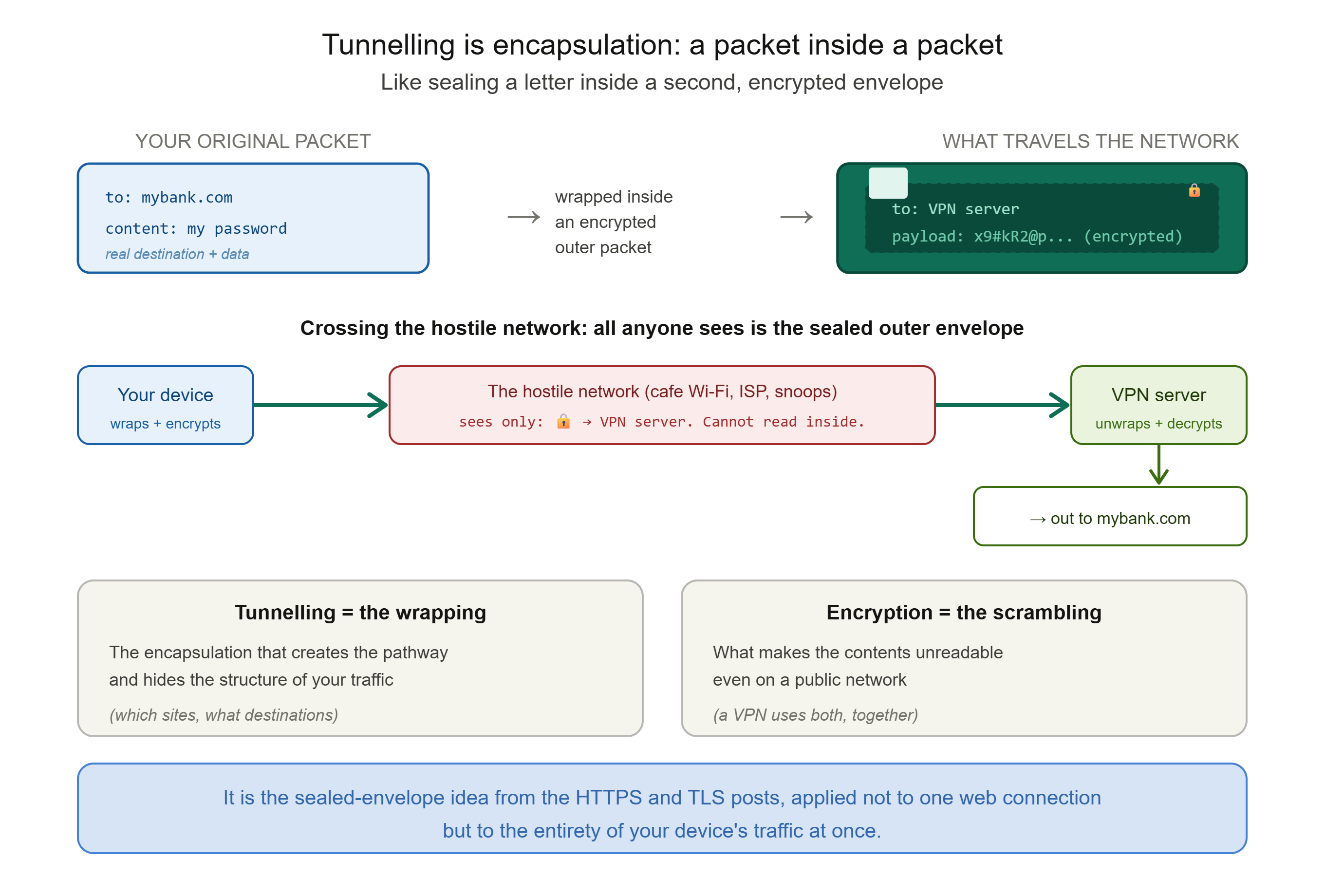
Tunnelling sounds mysterious, but the idea is simple and it builds directly on things we have already learned. Tunnelling works by encapsulation: wrapping packets inside other packets.
Recall from Post 2 that your data travels the internet broken into packets, each with a header showing its source and destination. Normally, anyone along the path can read those headers and see where your packet is going. Tunnelling takes each of your original packets and places it, entire, inside the body of a new outer packet, like sealing a letter inside a second envelope. That outer packet is encrypted, and it is addressed simply from your device to the VPN server. Your original packet, with its real destination, is hidden inside, as unreadable payload.
So anyone watching the network sees only the outer envelopes: a stream of encrypted packets travelling between you and the VPN server. They cannot see the letters inside, the real destinations, the actual content, any of it. Only the VPN server, at the far end of the tunnel, can unwrap the outer packet, decrypt it, and read the original inside to send it onward. This is why it is called a tunnel: your real traffic passes through the hostile network sealed inside a protective outer layer, untouchable along the way, like a train passing through a mountain without the mountain ever seeing what is in the carriages.
It is worth being precise about the relationship between tunnelling and encryption, because they are two different things working together. Tunnelling is the wrapping, the encapsulation that creates the pathway and hides the structure of your traffic. Encryption is what scrambles the contents so they cannot be read. A VPN uses both: it encapsulates your packets to route them through the tunnel, and encrypts them so that even though they cross a public network, they stay confidential. This is the sealed-envelope idea from the HTTPS and TLS posts, applied not to a single web connection but to the entirety of your device's traffic at once.
What a VPN Genuinely Protects You From
Let us be clear and generous about the real benefits, because they are real, and the honest critique later lands harder if we are fair here first.
It protects you on untrusted local networks. This is the strongest and most genuine benefit, and it answers the question we opened with. On that dangerous coffee-shop Wi-Fi, with a VPN switched on, the local attacker, the rogue DHCP server, the ARP poisoner, the network owner themselves, sees only your encrypted tunnel. The whole class of local-network attacks from the last post is defeated at a stroke, because there is nothing readable for them to intercept. If you regularly work from cafes, airports, and hotels, this alone is a legitimate reason to use one.
It hides your IP address from the websites you visit. The sites you reach see the VPN server's address, not yours. This meaningfully reduces how easily a given website can locate or identify you by IP, and it is genuine, if partial, privacy from the destinations you visit.
It hides your browsing from your internet service provider. Normally your ISP can see every domain you connect to. With a VPN, your ISP sees only an encrypted tunnel to the VPN server. For people who would rather their ISP not build a profile of their browsing, this is a real shift.
It lets you appear to be elsewhere. Because you emerge onto the internet from the VPN server's location, you can appear to be browsing from another country. This is what people use to access region-restricted content or to get around certain forms of local censorship, a genuinely valuable capability in places where the open internet is not a given.
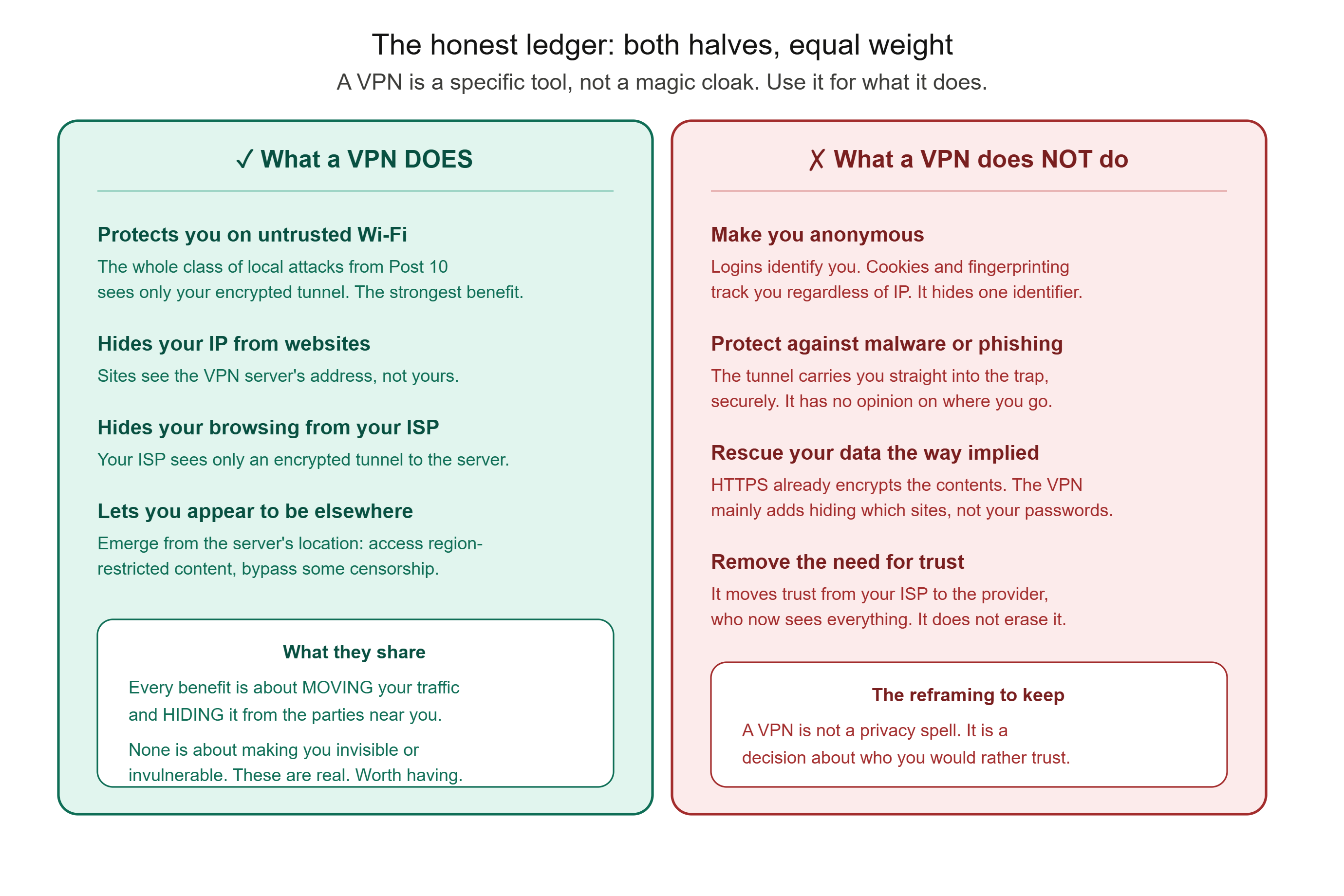
These are not small things. A VPN is a real tool that really does all of the above. If those are what you need, it delivers. But notice something about every single one of those benefits, because it is the key to the honest half of this post: each is really about moving your traffic somewhere else and hiding it from the parties near you. Not one of them is about making you invisible or invulnerable. And that distinction is where the marketing quietly parts ways with the truth.
The Honest Half: What a VPN Does Not Do
Here is where the series' commitment to telling you the real picture matters most, because the gap between what people believe about VPNs and what VPNs actually do is enormous. None of what follows means a VPN is useless. It means a VPN is a specific tool, not a magic cloak, and being sold the cloak leads people to take risks they would not take if they understood the tool.
A VPN does not make you anonymous. This is the big one. A VPN changes the IP address you appear to come from, but anonymity is a much higher bar, and a VPN clears almost none of it. The moment you log into any account, Google, Facebook, your email, you have identified yourself completely, VPN or not. Websites track you through cookies and browser fingerprinting, techniques we touched on in the HTTP post, which work regardless of your IP address. Your browser, your logged-in sessions, and the data that advertisers and data brokers already hold about you are all entirely untouched by a VPN. It cannot remove data that is already out there, and it cannot stop a site from recognising you once you have told it who you are. A VPN hides one identifier. Modern tracking uses many.
A VPN does not protect your data the way people think, because HTTPS already did. Here is a subtlety worth sitting with. As we learned in Posts 7 and 8, the overwhelming majority of the web already travels over HTTPS, encrypted end to end between your browser and the website. So on a modern connection, even without a VPN, a local snoop on the coffee-shop Wi-Fi cannot read the contents of your HTTPS traffic anyway. What they can still see without a VPN is which sites you are connecting to. So the VPN's real added protection on top of HTTPS is narrower than the marketing implies: it mainly hides the metadata, which sites you visit, rather than rescuing your passwords from certain interception, because HTTPS was already protecting the contents. The VPN is still useful here, but for a more modest and specific reason than "it stops hackers stealing your data."
A VPN does not protect you from malware, phishing, or scams. The tunnel faithfully and securely carries whatever you send through it, including your traffic to a phishing site or your download of a malicious file. A VPN has no opinion about where you are going or what you are fetching. If you click a phishing link, the VPN encrypts your journey straight into the trap. Security against these threats comes from other tools and from caution, not from a VPN.
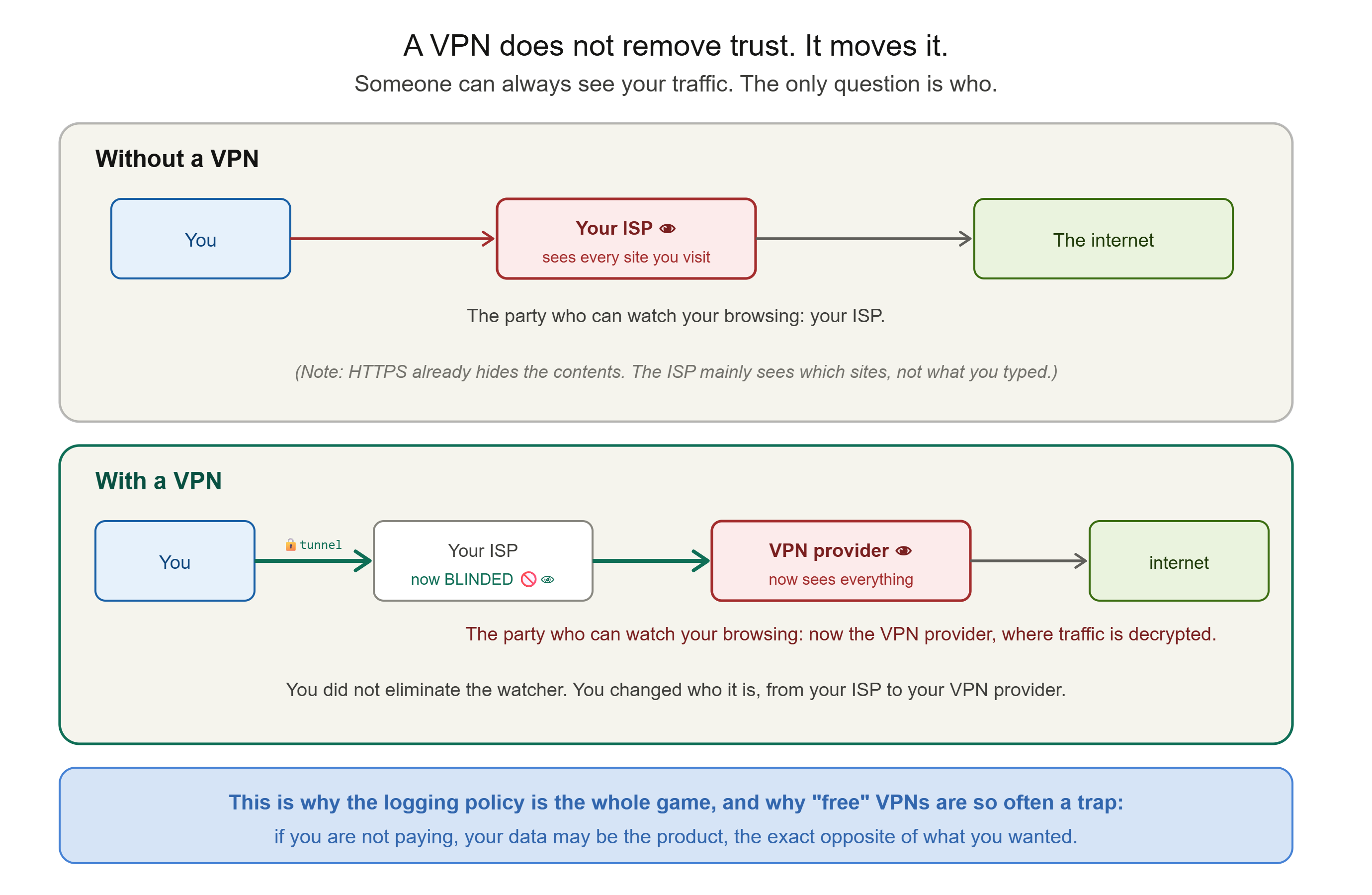
And the central point, the one that reframes everything: a VPN does not remove the need for trust. It moves it. Think carefully about what the tunnel actually does. Without a VPN, your internet service provider can see your browsing. With a VPN, your ISP is blinded, but the VPN provider now sees everything your ISP used to, because all your traffic flows through their server, where it is decrypted before going out to the internet. You have not eliminated the party who can watch your traffic. You have changed who that party is, from your ISP to your VPN provider. A VPN is not a privacy spell. It is a decision about who you would rather trust.
That reframing is the single most important thing to take from this post, and it leads directly to the questions that actually matter when choosing one.
If Trust Is the Whole Game, Choose Who You Trust Carefully
Once you understand that a VPN relocates your trust rather than removing it, the right questions become obvious, and they are very different from the ones the adverts answer.
The logging policy is everything. Since the provider can see your traffic, what matters is what they do with it. A genuine no-logs policy means the provider does not keep records that could tie you to your activity. But the phrase is slippery, and worth scrutinising: "no activity logs" is not the same as "no logs at all," and even strict providers typically still hold your sign-up email and payment details. The claims worth trusting are the ones that have been independently audited, rather than merely asserted on a landing page. You are, in effect, choosing a party to trust with everything your ISP used to see, so their trustworthiness is the entire product.
This is exactly why free VPNs are so often a trap. Running a VPN service, with its servers and bandwidth, costs real money. If a provider is giving it away and you are paying nothing, it is worth asking hard how they are funded, because the uncomfortable answer, for many free VPNs, is that your data is the product. They monetise the very traffic you installed them to protect, logging and selling your browsing to advertisers and data brokers, the precise opposite of what you wanted. You moved your trust from your ISP to a stranger whose business model is surveillance. There are a few genuinely reputable free tiers run by trustworthy providers, but the general rule holds: if you are not paying for the VPN, think very hard about how it pays for itself.
The honest summary is that a good consumer VPN is a paid service from a provider with an audited no-logs policy, used for the specific, real benefits above, with clear eyes about the benefits it does not provide.
The Other Kind of VPN: The Original One
Everything so far has been about the consumer privacy VPN, the kind advertised to the public. But there is another kind of VPN, older and arguably the original purpose of the technology, and it is worth understanding because it is probably what a VPN will mean in your professional life.
The remote-access VPN exists to let someone securely reach a private network from outside it. Imagine a company with internal systems, servers, databases, and tools that are not exposed to the public internet, reachable only from inside the office network. When an employee works from home, they need to reach those internal systems, but they are not physically on the office network. A remote-access VPN solves this: the employee's device establishes an encrypted tunnel to the company's VPN gateway, and once connected, their device behaves as though it were sitting inside the office network, able to reach the internal systems securely, with all the traffic protected as it crosses the public internet in between.
This is the "private network" in Virtual Private Network, taken literally. It creates a virtual extension of a private network across the public internet, so remote staff can work as if local. The purpose here is not to hide your IP from websites or to appear in another country; it is secure access to protected internal resources, and it is fundamental to how modern organisations let people work remotely. It is also, notably, built on exactly the same tunnelling and encryption we have described, just pointed at a different goal.
Understanding both kinds clarifies what the technology actually is. At its core, a VPN is one thing: an encrypted tunnel to a server that then connects onward on your behalf. Point that tunnel at a provider's server to reach the public internet, and you have a consumer privacy VPN. Point it at your company's gateway to reach internal systems, and you have a remote-access VPN. Same mechanism, two different destinations, two different purposes.

How to Reason About It
There are not many commands to run here, because a VPN is more a decision than a thing to inspect. But there is a way to reason about it that is worth more than any command.
When you turn on a VPN, ask yourself three questions:
First, what am I actually trying to protect against? If the answer is "snooping on untrusted Wi-Fi" or "hiding my browsing from my ISP" or "appearing to be in another country," a VPN is the right tool. If the answer is "becoming anonymous" or "staying safe from viruses and scams," it is the wrong tool, and you need something else.
Second, who am I now trusting? You are handing the VPN provider the ability to see your traffic. Have they earned that trust with an audited no-logs policy and a business model that is not built on your data?
Third, what am I still exposed to? Even with the VPN on, you are still trackable through logins, cookies, and fingerprinting, still vulnerable to phishing and malware, and still identifiable the moment you sign into anything. The VPN changed one thing; everything else is unchanged.
Answer those three honestly, and you will use a VPN for exactly what it is good for, and not rely on it for the things it cannot do. Which is, in the end, the whole point of understanding how something works instead of trusting the advert.
What You Now Understand
You came in surrounded by VPN marketing, and you leave understanding the tool better than most people who pay for one.
You know what a VPN actually is: an encrypted tunnel from your device to a provider's server, which then speaks to the internet on your behalf. You understand tunnelling as encapsulation, wrapping your packets inside encrypted outer packets so the hostile network sees only sealed envelopes, the sealed-envelope idea from the HTTPS posts applied to all your traffic at once. And you understand the two consequences that produce every benefit: the local network is blinded, and the websites see the provider's address instead of yours.
You know the genuine benefits, protection on untrusted Wi-Fi, hiding your IP from sites, hiding your browsing from your ISP, and appearing to be elsewhere, and you know they are real and worth having. And you know the honest other half, given equal weight: a VPN does not make you anonymous, does not shield you from malware or phishing, and protects your data less dramatically than implied because HTTPS was already doing that work. Above all, you understand the reframing that makes sense of everything: a VPN does not remove the need for trust, it moves it, from your ISP to your VPN provider, which is why the logging policy is the whole game and why free VPNs are so often the opposite of private.
And you understand that the same technology, pointed at a company's gateway rather than a provider's server, becomes the remote-access VPN that lets people work securely from anywhere, the original and arguably truest meaning of the name.
In the next post, we turn to the device that has been standing quietly at the edge of nearly every network we have discussed, deciding what is allowed in and what is kept out. We have mentioned it in passing many times; now we give it the full treatment. We will look at firewalls, how they actually work, the different kinds, and how they form one essential layer in the defence-in-depth approach this whole series has been building toward. That is Post 12.
This is Post 11 of the Networking Foundations series. If VPNs finally make sense, both what they do and what the adverts leave out, share it with someone about to buy a subscription because a video told them it would make them anonymous. New here? Start with Post 1, and Post 10 on the quiet protocols leads into this one. Subscribe to our newsletter to get each new post as it publishes.
Comments