Right now, without thinking about it, you are connected.
Your phone knows what time it is in Tokyo. Your laptop can retrieve a document stored on a server in Frankfurt in under a second. A security camera outside a shop in Birmingham sends footage to a storage system in a data centre miles away. A hospital in Manchester shares a patient's scan with a specialist in Edinburgh without either party having to move. None of this feels remarkable anymore. It has become the background noise of modern life.
However, before moving on, think about what is really going on. A huge number of devices, including phones, laptops, servers, cameras, sensors, smart speakers, hospital equipment, traffic lights, and aircraft, are continuously exchanging information at distances ranging from a few centimetres to several thousands of miles. Instantaneously. In a very dependable way. Almost secretly.
That is a network. And understanding what it really is, why it was built, and what it does is the foundation that everything else in this series builds on.
Before Networks: Computers in Isolation
To understand why networks exist, you need to understand what the world looked like before them.
In the 1950s and early 1960s, computers were not the devices you carry in your pocket today. These computers were large, expensive, and typically stored in specialized environments like universities, laboratories, or government institutions. They had limited connectivity and centralized control, meaning computer resources were controlled by a single machine. Users would typically interact with the computer using punch cards.
One such computer could very well occupy a whole room. Possibly, a university would have one. Perhaps a government department would be the owner of several. Some big companies might allow themselves such a luxury. These computers were really powerful instruments for performing calculations and handling data; however, they were totally isolated from each other. If, for instance, you wished to distribute your calculation results to a collaborator located in another research place, you would first have to print the results and then send them by post. Alternatively, you could have gone over to their computer in person.
Before ARPANET, computers worked in isolation. Communication with other machines wasn't possible.
This isolation had consequences beyond inconvenience. Researchers at different universities doing related work could not easily build on each other's results in real time. Expensive computing resources sat idle when one institution needed them, and another had spare capacity. And for the United States government, there was a much more alarming problem: its military and research infrastructure depended on centralised systems. If a Soviet strike destroyed a central node, entire communication chains could collapse.
The problem wasn't just efficiency. It was fragility.
The Question That Started Everything
Back in 1966, Robert Taylor, who was an employee at the United States Advanced Research Projects Agency (ARPA), was sitting in his office. The walls of that room were lined with the screens of three computer terminals. Each of these was connected to a different mainframe computer at a separate research institution.
Taylor got hold of the notion that it was senseless to demand three teletype machines just for mere communication with three incompatible computer systems. One single terminal could be connected to each of the other terminals through a single computer language protocol if the three were merged. This way, it would be far more efficient.
It was a deceptively simple observation. Why should communicating with a computer require a dedicated, incompatible physical machine for each one? Why couldn't one terminal speak to any computer? Why couldn't computers speak to each other at all?
Bob Taylor initiated the ARPANET project in 1966 to enable resource sharing between remote computers. The answer to Taylor's question would eventually become the internet. But it started as something far more modest: a small experimental network called ARPANET.
ARPANET: The First Network (1969)
The Advanced Research Projects Agency Network (ARPANET) was the first wide-area packet-switched network with distributed control and one of the first computer networks to implement the TCP/IP protocol suite. Both technologies became the technical foundation of the Internet.
The people who designed ARPANET had to deal with a major problem: how to move data effectively through the network? The already available model, which was carried out through telephone systems, was named circuit switching. If you placed a call, then a special, physical circuit was set up exclusively between you and the person you were calling, and that was valid for the entire call time. It ensured reliability; however, it was inflexible. If the slightest portion of that circuit got damaged, the call got terminated.
A key issue was maintaining communications, because if the ARPANET behaved like a traditional circuit-based telephone system, failure of a single node could take down the entire network. What was needed was a means to get messages to their destination in a way that did not depend on any single node. This is the challenge that spawned the concept of packet switching.
Packet switching represented a fundamentally different idea. The traditional approach was to have one dedicated circuit for data transmission; here, the data was divided into small pieces, packets, which were each marked with their source and destination. These packets could individually navigate through the network and might even follow different routes. Finally, the receiver would put them back together in the correct sequence. If one route was inaccessible, the packets could be diverted through alternative routes.
The network did not rely on a single point of failure. It was, by design, a resilient system.
The First Message: Two Letters and a System Crash
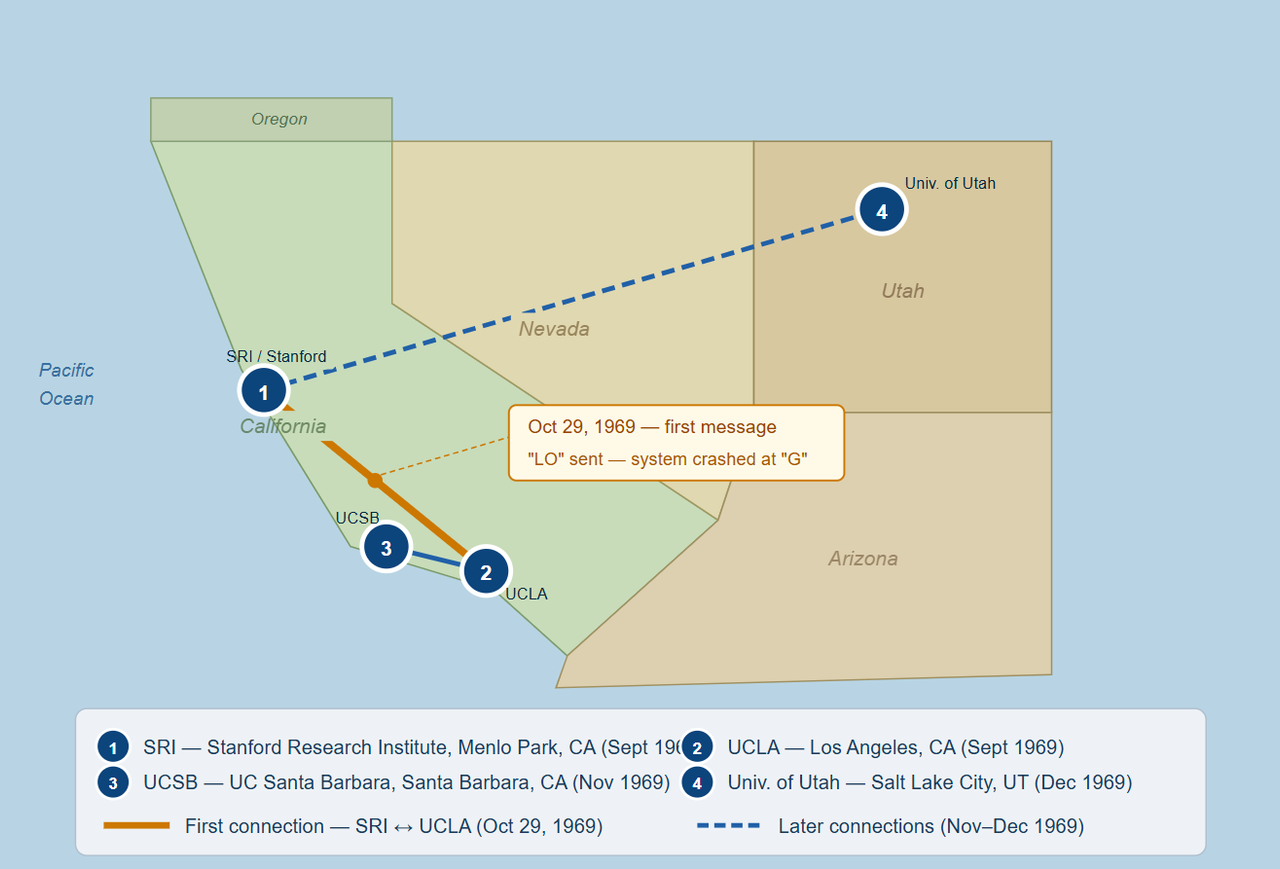
In its earliest form, the ARPANET began with four computer nodes, and the first computer-to-computer signal on this nascent network was sent between UCLA and the Stanford Research Institute on Oct. 29, 1969.
The message was simple: the word "LOGIN". A researcher at UCLA typed the L. Stanford received it. He typed the O. Stanford received it. He pressed the G, and the system at Stanford crashed. The first time that a computer network message was sent, it was "LO". The two letters 'L' and 'O' of the "login" were actually received before the system crashed, but this meant that the two systems could be connected over long distances.
It was, depending on how one looked at it, an incredible failure or a great success. Technically, the crash was just a minor issue. The principle had been proved. Two computers that were hundreds of miles apart had communicated. Barely a few months later, the connection was stable. In the coming years, the network was joined by more universities and research institutions. By the fifteen-year mark, it had changed into something that even the original guys could hardly comprehend. By January 1983, enough individual networks had been connected to each other cto such an extent that the ARPANET had become the Internet.
So What Is a Network?
Now that you understand where networks came from, a formal definition lands differently. A computer network is two or more devices connected in a way that allows them to communicate and share resources.
That is the entire definition by itself. Two devices and a connection. All other things, such as routers, switches, protocols, firewalls, cloud infrastructures, and the internet, are just extensions of that simple idea. The resources being shared can be anything: files, processing power, storage, internet access, printers, databases, and applications. The connection can be physical (a cable) or wireless (radio waves). The devices can be in the same room or on opposite sides of the planet.
Networks are networks not because of their size or complexity, but through the act of connecting and the binding mutual understanding embedded in that connection about how devices will communicate with each other. That agreement is called a protocol. We'll go deep on protocols in later posts. For now, understand that without agreed protocols, two connected devices are just two devices plugged into the same wire. The protocol is what gives the connection meaning.
Types of Networks: The Scale of Connection
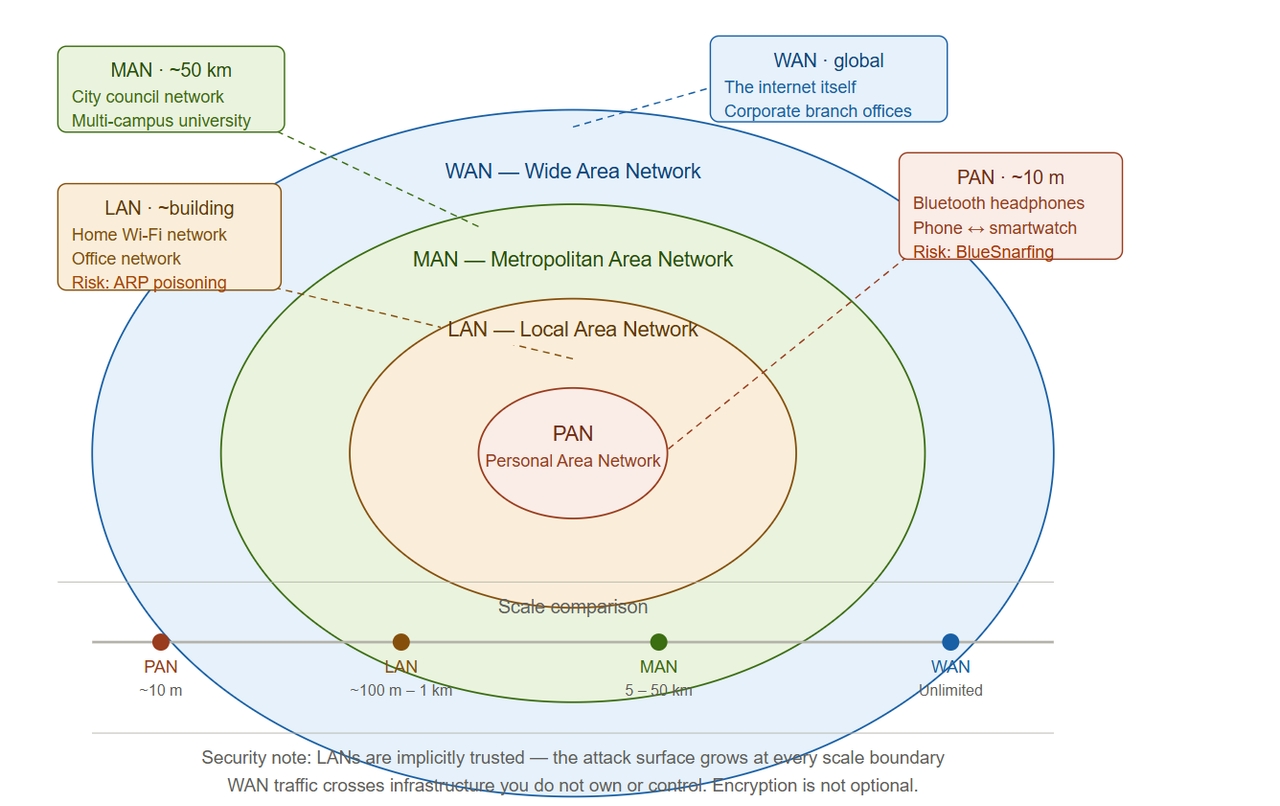
Networks come in different scales, each with its own name, purpose, and set of security considerations.
PAN: Personal Area Network
The smallest kind of a network. It links devices located in a user's personal space, generally within a distance of about 10 meters. Your Bluetooth headphones are connecting to your phone. Your phone is syncing with your smartwatch. Your laptop connects wirelessly to a portable speaker. All of these are PANs.
Security note: Bluetooth has a long history of vulnerabilities. Because PANs operate at close range and often use wireless protocols that users rarely think about securing, they are frequently overlooked in personal and corporate security policies. Attacks like BlueSnarfing (unauthorised access to Bluetooth devices) and BlueBugging (taking remote control) exploit exactly this blind spot.
LAN: Local Area Network
The most common one that we know. A LAN is a network of devices within one building or campus, a house, an office, a school, or a hospital floor. Your home Wi-Fi network is a LAN. The office network at a company headquarters is a LAN. The network in a university computer lab is a LAN.
A local area network (LAN) is a network confined to a small, localized area. Home WiFi networks and small business networks are common examples of LANs. LANs usually provide very fast data speeds and almost no delay in data transfer, as the data has to travel only a short distance. In addition, they are usually the property and in the control of the users, e.g., a household, a company's IT department, or a school's network team.
Security note: LANs are often implicitly trusted users on the same LAN are frequently given access to shared resources by default. This is exactly the trust model that attackers exploit through lateral movement, which we explored in the Firewall post. Being on the same LAN as someone doesn't mean you should trust their machine.
MAN: Metropolitan Area Network
A MAN establishes connections in a city or a metropolitan area throughout the networks that are bigger than LAN but smaller than WAN. A MAN usually extends 5-50 km, thereby covering a larger area than a LAN but a smaller one than a WAN. It links computer systems across a city or even between nearby cities. A city government connecting its municipal buildings. A university with multiple campuses across a city. A local internet service provider's infrastructure. These are all MANs.
Security note: MANs often rely on infrastructure shared across multiple organisations or routed through public carrier networks, increasing the attack surface significantly compared to a privately managed LAN.
WAN: Wide Area Network
A wide area network or WAN can be used to connect networks that are geographically apart. For instance, cities, countries, or even continents. The Internet itself is considered a WAN. But WANs also exist at smaller scales: a multinational company connecting its London, New York, and Singapore offices is operating a private WAN.
LANs are considered more secure than WANs. WANs are more susceptible to security threats due to their large scope and connection to the internet, which is a major source of security threats. To protect WANs from threats, encryption and other security protocols, such as VPNs and firewalls, must be implemented.
Security note: WAN traffic travels across infrastructure that organisations do not own or control, cables under oceans, routers in countries with different legal jurisdictions, and exchange points shared with thousands of other networks. Data in transit across a WAN is far more exposed than data on a private LAN, which is why encryption and VPNs exist.
The Security Truth Built Into the Foundation
Here is something that most introductions to networking gloss over, and it matters enormously for everything that follows in this series.
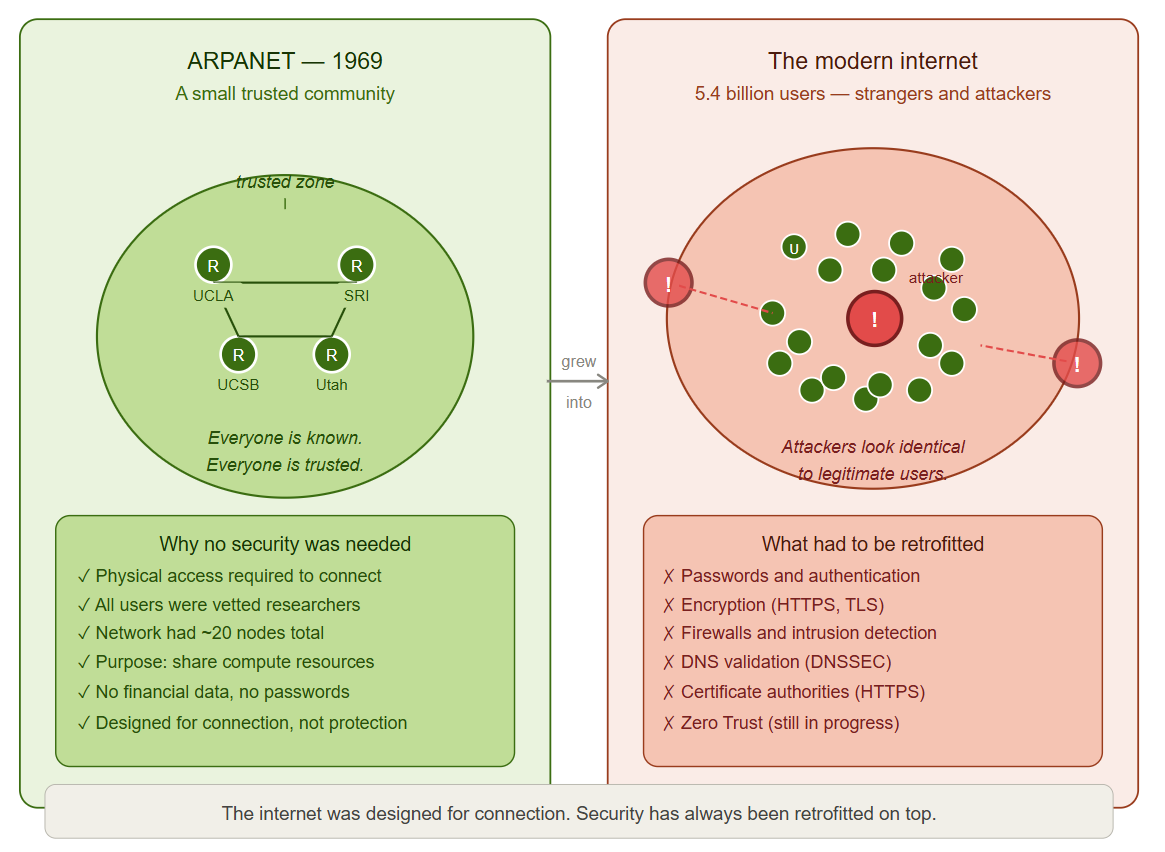
ARPANET — the origin of the internet — was designed for trust, not security.
Its users were researchers and academics at a small number of institutions. Everyone on the network was known. Everyone had legitimate access. The idea that a bad actor might connect to the network and attempt to cause harm was not a design consideration, because the network was not designed for strangers. One of ARPANET's original goals was to allow secure communications and the sharing of information between research facilities located in different parts of the world. However, "secure" in 1969 was understood as "available and reliable" rather than "protected from an attack". The security model was physical; you could only access the network if you were at an authorized terminal.
Then the network grew. And grew. And kept growing. Until the intimate, trusted community of a few dozen research institutions became the global public internet open to billions of people, including those with harmful intent. Most of the protocols that run the internet are, fundamentally, the offspring of systems created for a network where everyone was trusted. TCP/IP, the base protocol for the Internet, was made to transfer data in a reliable way, not for secrecy or security. HTTP, the protocol that runs the web, by default sends data in plaintext. DNS, the protocol for resolving domain names to IP addresses, was made with ease of use in mind rather than verification.
This is not a criticism of the people who built these systems. They were solving a different problem in a different world. But it is the single most important context for understanding why cybersecurity exists as a discipline at all. The internet was not designed to be secure. It was designed to be connected. Security has been retrofitted on top of a foundation that was never built for it. Every firewall, every encryption standard, every authentication protocol, every security framework you will ever encounter exists because of this foundational reality. Understanding networking means understanding this first.
What Happens When You Type a URL
Let's make all of this concrete. Right now, in the real world, what actually happens when you open a browser and type a web address?
- Your device makes DNS inquiry: it queries "which IP address corresponds to this domain name?", a DNS server on your network receives the query.
- A TCP connection is created: your device and the web server conduct a three-way handshake to reach an agreement for communication.
- Your request moves as packets: fragmented into small chunks, labelled, sent via your LAN, through your router, across your ISP's network, maybe through multiple intermediate networks, till the destination server.
- The server replies: the requested content is sent back as packets, which might be received in a mixed order and need to be reassembled by your device.
- Your browser shows the page: the collected data is checked, decoded, and displayed.
All this takes place in just a few milliseconds. Your home LAN, your ISP's WAN facilities, DNS servers, routing equipment, and the server itself all work in a synchronized manner according to the mutually agreed protocols. And every single one of those steps is a potential target for an attacker who knows what they're doing.
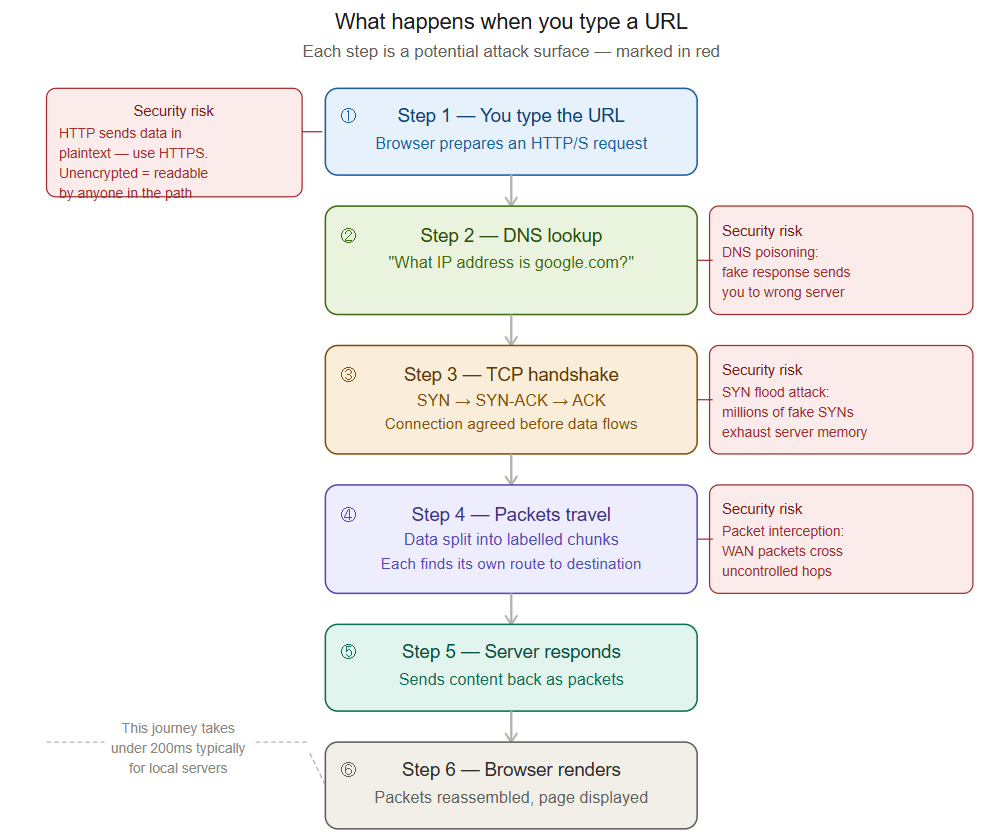
We'll thoroughly explain each of those steps. That's what the rest of this series is about, anyway. But the fact that they all happen, and the reason they happen, is what this introduction is about.
Commands to Try Right Now
Understanding networking doesn't stop at the conceptual level. Here are three commands you can run right now on your own machine to see your network in action.
On Windows:
ipconfig
Shows your device's IP address, subnet mask, and default gateway, the basic addressing information that places your device on the network.
On macOS / Linux:
ifconfig
or on newer Linux systems:
ip a
Same information as above, formatted differently.
Everywhere: the most fundamental networking command:
ping google.com
Sends a small packet to Google's servers and measures how long it takes to get a response. This is the simplest possible test to see if your device can reach another device across the network. The time shown (in milliseconds) is your latency how long data takes to travel between two points.
traceroute google.com
(On Windows: tracert google.com)
This shows every network hop between your device and Google, every router your data passes through on its journey. Run this and look at the list. Those are real network nodes, each one a step in the path your data takes across the internet.
The Foundation You Now Have
You have an understanding of a network and its purpose. You also realized that it came out of frustration, ingenuity, and Cold War era-specific pressures. Besides that, you realize that the very first message sent through a network was essentially a system error alert, and yet, it still worked.
You are familiar with the four main types of networks in terms of scale, PAN, LAN, MAN, WAN, and have an idea about the typical use of each one. Besides that, you know that the most fundamental fact: the internet was created for communication, not security. Safeguards were merely a secondary afterthought that was added on top of a trust-based system. Everything is influenced by that frame of reference.
In the following article, we unlock one more layer: a network-level view of data transmission. A packet, its contents, its heading, its travel, and the destination it finds, and the cases when it doesn't, are covered.
You are reading Post 1 of the Networking Foundations series. If you found this post helpful in making networking seem more tangible and less theoretical, please share it with someone who has been delaying learning this stuff. Also, subscribe to our newsletter to receive each new post of the series directly in your inbox.
Comments