
Every post in this series has had a shadow. The OSI layers trusting the layer beneath. IP addresses that locate a machine but authenticate no one. DNS that cannot verify its own answers. TCP handshakes weaponised, certificates forged, routes hijacked, local networks poisoned. Again and again we found that the thing making the internet work was also the thing that made it vulnerable, because it was built to trust.
So far we have mostly been diagnosing. Now we start treating. And the first dedicated defensive tool, the one standing quietly at the edge of nearly every network we have described, deciding what gets in and what stays out, is the firewall. We have mentioned it in passing a dozen times. This post gives it the full treatment it deserves, and then builds from it to the single most important idea in network defence: that no one wall, however strong, is ever enough.
By the end you will understand how firewalls actually make their decisions, from the crude to the sophisticated, and you will understand the principle, defence in depth, that reframes security from "build a strong wall" to "assume every wall can fail, and plan for it." That shift is the intellectual bridge to where this whole series has been heading.
What a Firewall Actually Is
Strip away the imagery and a firewall is something simple: a filter that sits at a boundary and decides, for each piece of traffic trying to cross, whether to allow it or block it, according to a set of rules.
The intuition is a security guard at a door with a clipboard. Every person trying to enter is checked against the guard's list of rules. Some are waved through, some are turned away, based on criteria the guard has been given. A firewall does exactly this for network traffic, sitting at a boundary between networks, inspecting the packets that try to pass, and permitting or dropping them according to its ruleset.
There is one foundational choice that shapes a firewall's entire character, and it is worth naming up front: default-deny versus default-allow. A default-allow firewall permits everything except what is explicitly forbidden, a blacklist. A default-deny firewall blocks everything except what is explicitly permitted, a whitelist. Default-deny is the far safer posture, because it fails closed: anything you did not think of is blocked rather than allowed. This is the first appearance of a theme that runs through all of good security, assume the worst and require things to be explicitly permitted, and it is the same instinct that, taken to its conclusion, becomes Zero Trust.
But a guard at a door is only as good as what they are able to check. And firewalls differ enormously in how deeply they can actually look at the traffic crossing them. This is the real substance of how firewalls work, so let us go through it properly, from the simplest to the most sophisticated.
How Firewalls Decide, From Crude to Sophisticated
Firewalls have evolved through three broad generations, each able to see more than the last, and each costing more to run. Understanding the three is understanding firewalls, and happily, each one builds directly on things we have already learned in this series.
Packet Filtering: Judging Each Packet Alone
The simplest firewall is a packet filter, and it judges each packet in isolation, by its headers alone. Recall from the OSI, IP, and TCP posts that every packet carries a header announcing its source address, its destination address, the protocol, and the port numbers. A packet-filtering firewall reads exactly these fields and checks them against its rules: allow traffic to port 443, block traffic from this address range, permit this protocol, deny that one.
This is fast and cheap, because it is a quick look at a few header fields and a decision. But it has a serious limitation: it has no memory. It treats every packet as a standalone event, with no idea whether a given packet belongs to a conversation you started or is an unsolicited stranger. It also cannot see inside the packet, only the headers, so it has no idea what the packet actually contains. It knows the envelope's address but never the letter. That blindness leaves it weak against spoofed traffic and anything hidden in the payload.
Stateful Inspection: Remembering the Conversation
The next generation, stateful inspection, fixes the memory problem, and it does so using the exact machinery from the TCP post. A stateful firewall keeps a state table, a record of every active connection passing through it. When your device opens a TCP connection, remember the three-way handshake from Post 6, the firewall notes it, creating an entry in its table recording the addresses, ports, and the connection's status.
This changes everything about what the firewall can reason about. Now, when a packet arrives, the firewall can ask a far smarter question than "does this match a rule?" It can ask, "is this packet part of a connection I already know about?" Return traffic for a connection you legitimately started is recognised and allowed automatically. But an unsolicited inbound packet that matches no existing connection, exactly what an attacker probing from outside would send, matches no entry in the table and is dropped. The firewall now understands context: the difference between a reply to a conversation you began and a stranger knocking uninvited. This is the standard for general perimeter protection, and it is a direct application of understanding TCP connection state.
It still, however, mostly looks at headers and connection state, not the actual contents. To see inside the letter, you need the third generation.
Application-Layer Firewalls: Reading the Contents
The most sophisticated firewalls, often called application-layer firewalls or next-generation firewalls, can inspect the actual payload, the content of the traffic, not just its headers. This is deep packet inspection, and it operates all the way up at Layer 7, the application layer.
Now the firewall can understand the traffic the way an application would. It can read the actual HTTP request from Post 7 ( HTTP and HTTPS: The Language of the Web, and the S That Protects It )and block a malicious one while allowing legitimate ones to the very same server and port, a distinction a packet filter cannot even perceive. It can identify which application is really generating traffic regardless of the port it uses, tie traffic to specific users, and scan payloads for known malware signatures and attack patterns. This is the firewall that can catch an attack hidden inside otherwise normal-looking traffic.
But this power has a real and honest cost, and it is one worth stating plainly because it connects directly to earlier posts. Inspecting full payloads is far more computationally expensive than glancing at headers, adding latency and requiring serious hardware. And there is a deeper limit: much of today's traffic is encrypted with TLS, from Post 8. A firewall cannot read what it cannot decrypt. So to inspect encrypted traffic, these firewalls must perform TLS decryption, intercepting the encrypted connection, decrypting it to inspect, then re-encrypting it, a process that is expensive, can meaningfully reduce throughput, and is itself a sensitive operation with its own trust implications. The encryption that protects you from attackers also blinds your defender, and resolving that tension is genuinely hard.
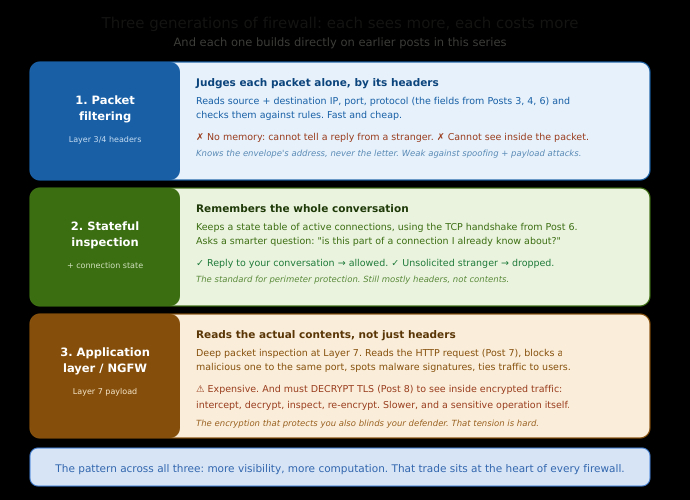
Notice the pattern across all three generations: each tier sees more, and each tier costs more. More visibility, more computation. That trade sits at the heart of every real firewall decision.
Two Places a Firewall Lives: The Edge and the Device
Firewalls do not only sit at one place. There are two distinct positions, and understanding why you want both is your first real taste of the principle this whole post builds toward.
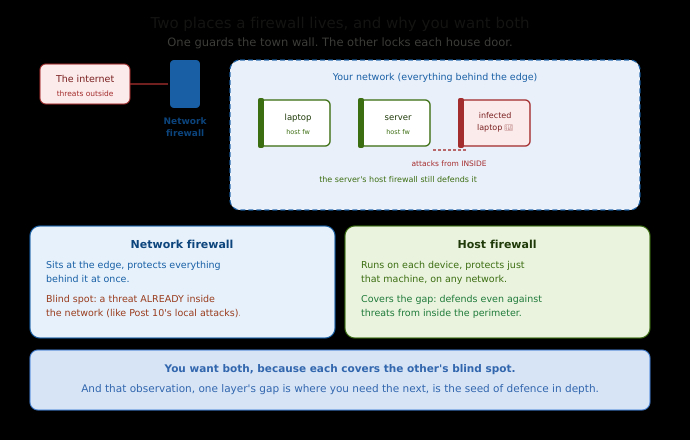
A network firewall sits at the boundary of a whole network, the edge, where your network meets the wider internet. It protects everything behind it at once, filtering traffic entering and leaving the entire network. This is the classic perimeter firewall, the wall around the town.
A host firewall runs on an individual device, your laptop, a single server, protecting just that one machine, regardless of what network it is on. Your computer's built-in firewall is one of these.
Why would you want both, when the network firewall already guards the edge? Because the network firewall protects you only from threats coming across that edge. It does nothing about a threat that is already inside the network, another infected machine on the same office or cafe network, for instance, as we saw with the local-network attacks back in Post 10 ( The Quiet Protocols: DHCP, ARP, and ICMP, the Three That Run Your Network Before You Notice ). The host firewall defends each machine individually, even against threats that originate from inside the perimeter. One wall guards the town; the other locks each house's door. You want both, because either alone leaves an obvious gap. And that observation, that one layer's blind spot is exactly where you need another layer, is the entire idea of defence in depth.
Defence in Depth: Assume Every Wall Will Fail
Here is the heart of the post, and one of the most important ideas in all of security.
The naive mental model of network security is a single strong wall: build a tough perimeter, keep the attackers out, and trust everything inside. It is intuitive, and it is wrong, and understanding why is a genuine turning point in how you think about security.
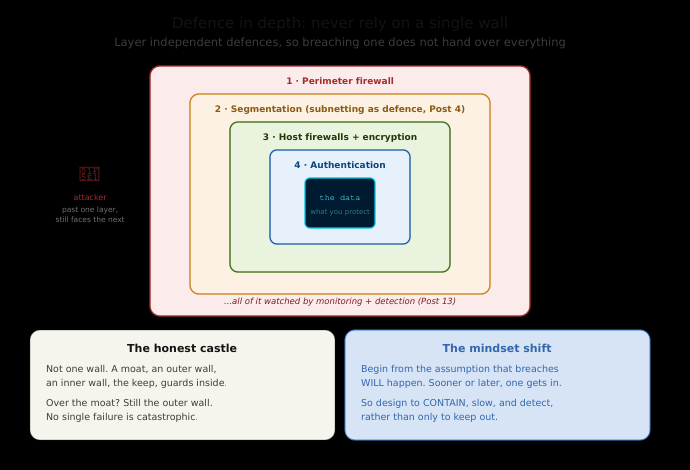
Defence in depth is the principle that you should never rely on a single security measure, because any single measure can fail. Instead, you layer multiple independent defences, so that if one is breached, the next still stands. The honest castle analogy is not one wall; it is a moat, then an outer wall, then an inner wall, then the keep, then guards inside the keep. An attacker who gets over the moat still faces the outer wall. One who scales the outer wall still faces the inner. No single failure is catastrophic, because no single layer was ever the whole defence.
Translated into a network, defence in depth means a perimeter firewall, and host firewalls on each device, and network segmentation, and encryption, and authentication, and monitoring, and more, arranged so that breaching any one does not hand over everything. Segmentation deserves special mention, because it is the subnetting from Post 4 used as a weapon of defence: by dividing a network into isolated zones, you ensure that an attacker who compromises one part cannot freely roam into the rest. The breach is contained to a segment instead of spreading across everything.
And this is the crucial mental shift. Defence in depth begins from the assumption that breaches will happen. You do not design only to keep attackers out, because sooner or later one gets in, through a phishing email, a stolen password, a vulnerability you did not know about. You design so that when one does get in, the damage is contained, slowed, and detected, rather than total. Security stops being a wall and becomes a series of obstacles and tripwires, all the way down. A firewall, in this light, is not the answer. It is one essential layer among many, and treating it as the whole of security is the classic, dangerous mistake.
The Model That Fails: Hard Shell, Soft Centre
Which brings us to the specific failure that this entire series has been quietly circling, and that the next posts confront directly.
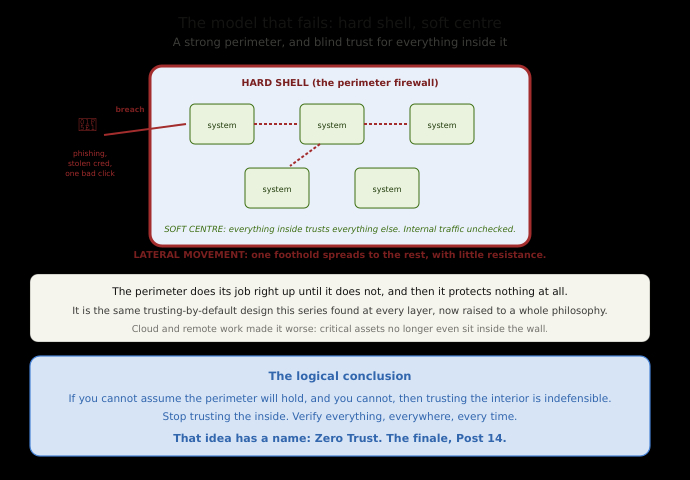
The traditional approach to network security is often called "hard shell, soft centre." You build a strong, hard perimeter, the firewall at the edge, and inside that perimeter, you trust everything. Devices inside the network are assumed to be friendly. Internal traffic is largely unchecked. The whole security model rests on one assumption: that the perimeter will hold, and that anything inside it is safe.
Look closely and you will recognise this as the same trusting-by-default design we have found at every single layer of the internet, now elevated into an entire security philosophy. And it fails for exactly the reason all those protocols failed: the trust is misplaced. The perimeter does not always hold.
Think about what happens when it does not. An attacker gets inside, and it does not take much, a single employee clicking a phishing link, one stolen VPN credential, one infected laptop brought in from home, one malicious insider. The hard shell is breached. And now, inside the soft centre, the attacker finds a trusting network that treats them as a legitimate occupant. Because internal traffic is unchecked and internal systems trust one another, the attacker can move sideways from the one machine they compromised to others, and others again, spreading through the network with little resistance. This is called lateral movement, and it is how a single foothold becomes a total breach. The hard shell did its job right up until it did not, and then it protected nothing at all.
This is the real reason defence in depth matters, and it is also the reason the industry has moved beyond the perimeter model entirely. If you cannot assume the perimeter will hold, and you cannot, then trusting everything inside it is indefensible. The logical conclusion is radical and simple: stop trusting the interior. Stop assuming that being inside the network means being safe. Verify everything, everywhere, every time, regardless of whether it sits inside the perimeter or outside it.
That idea has a name, and it is where this series has been heading from its very first post. It is called Zero Trust, and it is the subject of our finale.
Commands to See It Yourself
Your own machine has a host firewall you can inspect.
On Linux, check the simple firewall (ufw) status and rules:
sudo ufw status verbose
This shows whether the firewall is active, its default policies (look for the default-deny or default-allow posture we discussed), and the specific rules permitting or blocking traffic.
Look at the underlying firewall rules directly:
sudo iptables -L -n -v        (the classic tool)
sudo nft list ruleset         (the modern replacement)
These show the actual rule chains the kernel uses to decide the fate of each packet. You are reading the real ruleset, the guard's clipboard, for your own machine.
See what is listening, the open doors a firewall exists to protect:
sudo ss -tulpn
Each line is a service accepting connections on a port. A firewall's job is to control who is allowed to reach these. Seeing what is open on your own machine is the first step in understanding what you are defending.
On macOS and Windows, the built-in firewall lives in system settings (macOS: Network settings; Windows: Windows Defender Firewall), where you can see and control which apps are allowed to accept incoming connections.
What You Now Understand
You met the firewall properly at last, and you understand it as what it is: a filter at a boundary that allows or blocks traffic by rules, ideally in a default-deny posture that blocks anything not explicitly permitted.
You understand the three generations and, crucially, how each builds on this series. Packet filtering judges each packet by its headers alone, fast but blind to context and contents. Stateful inspection tracks whole connections in a state table, using the TCP handshake machinery to tell a reply to your conversation from an uninvited stranger. And application-layer firewalls read the actual payload up at Layer 7, catching attacks hidden in otherwise normal traffic, at a real cost in computation and against the genuine limit that they must decrypt TLS to see inside it. More visibility, more cost, at every tier.
You understand that firewalls live both at the network edge and on individual hosts, and that you want both because each covers the other's blind spot, which is the seed of the larger principle. And you understand that principle, defence in depth: never rely on one measure, layer many independent defences, use segmentation to contain breaches, and above all assume breaches will happen and design so they are contained rather than catastrophic.
Most importantly, you understand why the intuitive model, a hard shell around a soft, trusting centre, is the classic failure. Once the perimeter is breached, and perimeters are always eventually breached, a trusting interior lets an attacker move laterally and turn one foothold into everything. That realisation, that you cannot trust the inside just because you built a wall around it, is the same trust problem this series has found everywhere, now demanding a wholesale answer.
In the next post, before we reach that answer, we look at the layer that makes defence in depth actually work: not the walls themselves, but the watchers. We will cover network monitoring, detection, and response, how you actually see what is happening on a network, spot the attacks the earlier posts described, and act on them, because a defence you cannot see through is only half a defence. That is Post 13, and then Post 14 brings the whole series home with Zero Trust.
This is Post 12 of the Networking Foundations series. If firewalls and defence in depth finally click, and you can see why a single strong wall is never enough, share it with someone who still thinks security means one good firewall. New here? Start with Post 1, and Post 11 on VPNs leads into this one. Subscribe to our newsletter to get each new post as it publishes.
Comments