
At the end of the last post, we zoomed out to see the whole OSI model, seven layers, each with one job. Then we promised to come back and zoom all the way into one of them: Layer 3, the network layer, the home of the thing that makes global communication possible in the first place.
That thing is the IP address.
Every device that speaks to another device across a network needs one. Your phone has one right now. So does the server hosting this page, the router in your home, and the laptop you might be reading this on. Without addresses, there is no way to say "send this here rather than there," and the entire idea of a network collapses. The IP address is the network layer's answer to a single question: on a planet with billions of connected devices, how does data find the one specific machine it is meant for?
This post answers that question completely. What an address actually is, why we nearly ran out of them, how your home network quietly shares a single public one, how the newer system fixes the shortage, and finally, subnetting: the skill that trips up more networking learners than any other, taught here in the order that actually makes it stick.
What an IP Address Actually Is
Let us start with the concept, before any notation.
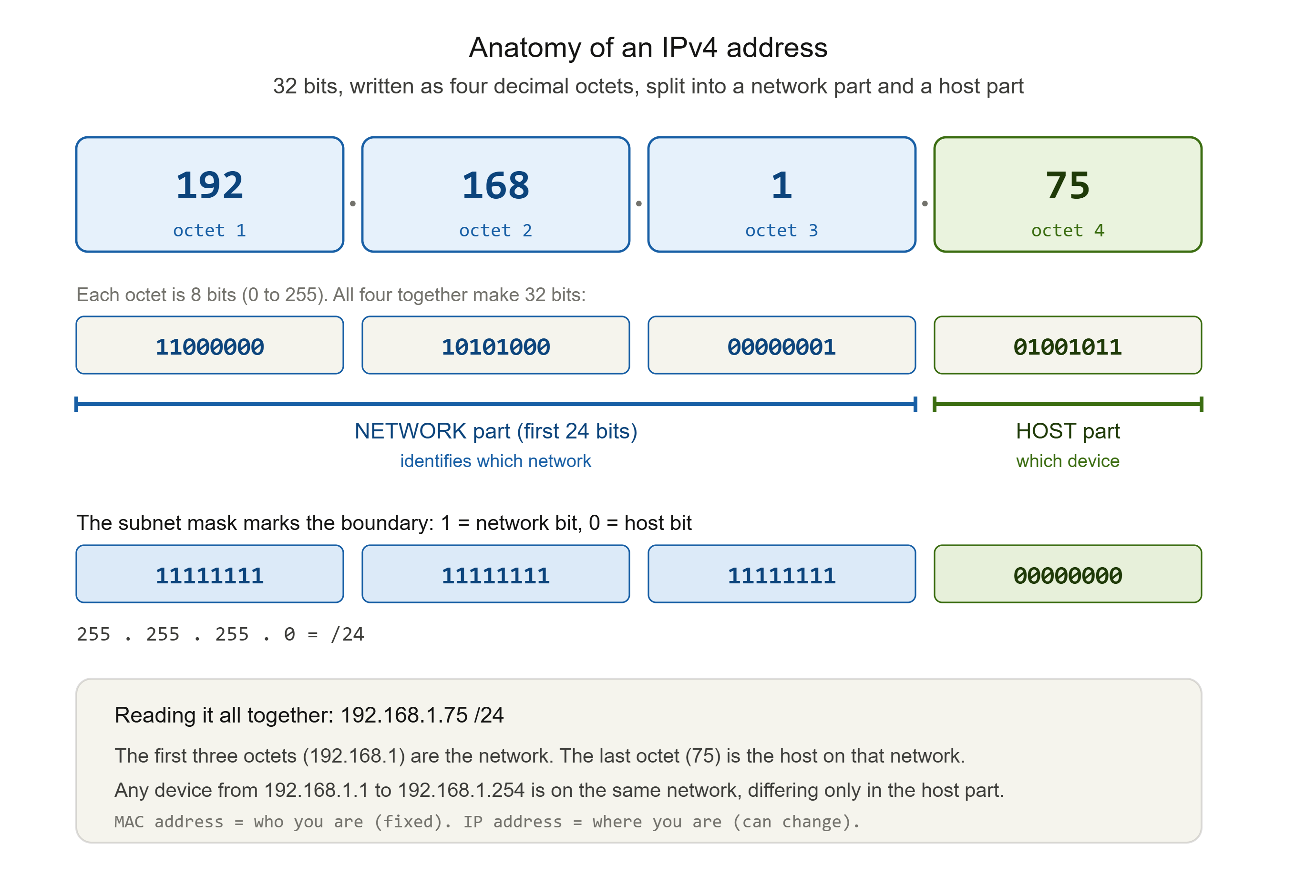
An IP address is a numerical label assigned to every device on a network that uses the Internet Protocol. It does two jobs at once: it identifies the device, and it locates that device within the network. Those are subtly different things, and both matter. Identification says "this is who you are." Location says "this is where you are, so traffic can be routed to you."
Here is the important word: an IP address is a logical address, not a physical one. Remember from Post 3 that every device also has a MAC address, burned into its hardware at the data link layer. That MAC address is like a person's fingerprint. It never changes and it is tied to the physical device forever. An IP address is different. It is like a mailing address. It describes where you currently are on the network, and it can change when you move. Connect your laptop to a different network and it gets a different IP address, just as you would have a different postal address if you moved house. The laptop is the same laptop, its fingerprint is unchanged, but its location, its logical address, is now different.
This is the postal analogy we have been building since Post 2, and it holds all the way up. The MAC address is who you are. The IP address is where you live. Routing, the job of getting data across the world, depends entirely on the second one.
IPv4: The Original System, and Why We Ran Out
The version of IP addressing that built the internet is called IPv4, and it has been in use since 1983.
An IPv4 address is a 32-bit number. In practice you never see it as 32 raw bits, because that would be unreadable. Instead it is split into four groups of 8 bits, each group written as a decimal number from 0 to 255, joined by dots. That is why IP addresses look the way they do:
192.168.1.75
Each of those four numbers is called an octet, because it represents 8 bits. Eight bits can hold 2 to the power of 8, which is 256 values, giving the range 0 to 255 that you see in every octet. The same address in binary looks like this:
11000000.10101000.00000001.01001011
That is the exact same address, just shown as the bits the machine actually works with. We will need this binary view later for subnetting, so keep in the back of your mind that every dotted-decimal address is really just 32 ones and zeros wearing a friendlier costume.
Now the problem. If an IPv4 address is 32 bits, then the total number of possible addresses is 2 to the power of 32, which is about 4.3 billion. In 1983, when there were a few hundred computers on the entire network, 4.3 billion seemed limitless. But the internet grew into a world of billions of phones, laptops, servers, cameras, thermostats, cars, and sensors, and 4.3 billion stopped being nearly enough. This is called IPv4 address exhaustion, and it played out over the 2010s exactly as engineers had feared decades earlier.
The industry responded in three ways. Two were stopgaps to stretch IPv4 further: private addressing and NAT, which we will cover next. The third was the real long-term fix: a brand-new addressing system with a vastly larger space, called IPv6. Almost every strange or clever thing about modern addressing traces back to this one root cause, the slow exhaustion of a 4.3 billion address ceiling that was set in 1983.
Public vs Private Addressing, and the Trick That Saved IPv4
Here is a question that reveals how the stopgap works. You might have five, ten, or twenty devices connected to your home network right now. Each one has an IP address. Yet your entire home shows up to the outside internet as a single address. How?
The answer is the split between public and private addressing, joined by a translation trick called NAT.
Three ranges of IPv4 addresses are reserved for private use, meaning they are never routed on the public internet. They are defined in a standard called RFC 1918, and they are:
10.0.0.0        to  10.255.255.255
172.16.0.0      to  172.31.255.255
192.168.0.0     to  192.168.255.255
Anyone can use these ranges inside their own network without asking permission, because they are not globally unique. Millions of home networks around the world use 192.168.0.x at the same time, and that causes no conflict, precisely because these addresses never appear on the public internet. This is why, if you check your laptop's address at home, it very likely starts with 192.168 or 10. That is a private address, visible only inside your own network.
So how does your privately-addressed laptop reach a public website? Through Network Address Translation, or NAT. Your router holds one public address, the one your internet provider assigns you, and it sits at the boundary between your private network and the public internet. When your laptop sends a request out, the router rewrites the packet so that it appears to come from the router's single public address. When the reply comes back, the router remembers which internal device asked, and forwards it to the right place. Every device in your home shares that one public address, taking turns through the router's translation table.

NAT was one of the two great stopgaps that kept IPv4 alive far longer than its address count should have allowed. It also has a quiet security side effect worth naming: because your internal devices are not directly addressable from the public internet, they are somewhat shielded from direct inbound connection. NAT was never designed as a security control, and it should never be relied on as one, but the isolation it creates is a real and useful side effect. We will come back to that idea, deliberate isolation, when we reach the security section, because it is the heart of why subnetting matters.
IPv6: The Real Fix
Stopgaps buy time. IPv6 was built to end the shortage permanently.
Where an IPv4 address is 32 bits, an IPv6 address is 128 bits. That change sounds modest, four times the bits, but because each added bit doubles the space, the result is staggering. IPv4 offers about 4.3 billion addresses. IPv6 offers 2 to the power of 128, which is roughly 340 undecillion, a number so large it is effectively beyond exhaustion. To put it in perspective, the smallest standard IPv6 subnet allocation contains more addresses than the square of the entire IPv4 internet. We are not going to run out of IPv6 addresses.
Because 128 bits would be absurd to write in dotted decimal, IPv6 uses a different notation: eight groups of four hexadecimal digits, separated by colons. A full IPv6 address looks like this:
2001:0db8:0000:0000:0000:8a2e:0370:7334
There are shorthand rules to compress the long runs of zeros, so in practice you often see something much shorter, like 2001:db8::8a2e:370:7334. The double colon stands in for a run of zero groups.
Two honest points about IPv6. First, it is not a distant future thing, it is here and running now, and it has been deploying since the mid-2000s. Second, and just as honestly, IPv4 has not gone away. Both systems run side by side across the internet today, and they will for years to come. This is why a working engineer has to be fluent in both, not one or the other. IPv6 is the destination, IPv4 is the enormous installed base we still live with, and the reality on the ground is both at once.
Subnetting: The Part Everyone Dreads, Done in the Right Order
Now for the section that makes people give up on networking. We are going to make it stick by building the idea first and doing the maths second.
Why divide a network at all?
Imagine a single flat network with thousands of devices on it. Every device can talk directly to every other device. This sounds convenient, but it is a problem for two reasons.
The first is noise and performance. Some network traffic is a broadcast, a message sent to every device at once. On a huge flat network, broadcasts reach thousands of machines, and all that unnecessary chatter clogs the network. The second reason is the one this series cares about most: security. On a flat network, anything that gets in can reach everything. There are no internal walls. An attacker or a piece of malware that compromises one machine can move sideways to every other machine, because they are all on the same undivided space.
Subnetting is the solution to both problems. It is the practice of dividing one large network into smaller, self-contained sub-networks, called subnets. Each subnet is its own contained space. Broadcasts stay inside their own subnet instead of flooding everything, which fixes the performance problem. And traffic between subnets has to pass through a router, where it can be filtered and controlled, which fixes the security problem by creating exactly the kind of internal walls a flat network lacks.
That is the whole idea. Everything below is just how we express it precisely.
The network part and the host part
Every IP address is secretly divided into two sections. The first section identifies the network (or subnet) the device is on. The second section identifies the specific device, called the host, within that network.
Think of the postal analogy one more time. A full address like "12 Baker Street, London" has a part that identifies the area (London, the street) and a part that identifies the specific building (number 12). The network part of an IP address is the area. The host part is the specific building. Devices in the same area, on the same subnet, share the same network part and differ only in their host part.
The question is: where is the dividing line between the two parts? That line is set by something called the subnet mask.
The subnet mask and CIDR notation
A subnet mask is a 32-bit value that marks which bits of an address belong to the network part and which belong to the host part. Every bit set to 1 in the mask means "this bit is network." Every bit set to 0 means "this bit is host." The ones always come first, all together, followed by the zeros.
The most common subnet mask is:
255.255.255.0
In binary that is twenty-four 1s followed by eight 0s. It says the first 24 bits of the address are the network, and the last 8 bits are the host.
Writing out full subnet masks is tedious, so modern networking uses a shorthand called CIDR notation. You simply write the address, a slash, and the number of network bits. So instead of saying "192.168.1.0 with a mask of 255.255.255.0," you write:
192.168.1.0/24
The /24 means "the first 24 bits are the network part." This single number, the prefix length, tells you everything about how the address is divided. A larger number after the slash means more bits given to the network and fewer left for hosts, which means a smaller subnet with fewer devices. A smaller number means a bigger subnet. That inverse relationship trips people up at first, so hold onto it: bigger slash number, smaller network.
The maths, worked step by step
Now we do the actual calculation, and because you understand what you are calculating, it will make sense rather than feel like magic.
For any subnet, there are a few things you want to work out: how many devices it can hold, the network address, and the broadcast address. Here are the rules, then a full worked example.
Counting the hosts. If a subnet has some number of host bits, call it h, then the number of usable device addresses is 2 to the power of h, minus 2. The formula is:
usable hosts = 2^(32 - prefix) - 2
Why minus 2? Because two addresses in every subnet are reserved and cannot be given to a device. The very first address, where all host bits are 0, is the network address, which names the subnet itself. The very last address, where all host bits are 1, is the broadcast address, used to send to every device in the subnet at once. Neither can be assigned to a real device, so we subtract them.
A full worked example: 192.168.1.0/24

The prefix is /24, so 24 bits are network and 32 minus 24, which is 8, are host.
Usable hosts = 2^8 - 2 = 256 - 2 = 254
Network address   = 192.168.1.0     (all 8 host bits = 0)
First usable host = 192.168.1.1
Last usable host  = 192.168.1.254
Broadcast address = 192.168.1.255   (all 8 host bits = 1)
So a /24 gives you 254 usable addresses, from .1 to .254, with .0 and .255 reserved. This is the classic home and small office network.
Now let us actually subnet: splitting that /24 into four smaller networks
Suppose you have that one /24 and you want to divide it into four separate subnets, perhaps one each for staff, guests, servers, and IoT devices, so you can wall them off from one another. This is subnetting in action.
To make four subnets, you need to borrow bits from the host part and give them to the network part. Four subnets is 2 to the power of 2, so you borrow 2 bits. Your prefix grows from /24 to /26.
A /26 means 26 network bits and 6 host bits. Let us work out one subnet fully:
Prefix /26  ->  host bits = 32 - 26 = 6
Addresses per subnet = 2^6 = 64
Usable hosts = 64 - 2 = 62
And the four subnets carve up the original range like this:
192.168.1.0/26    hosts .1   to .62     (broadcast .63)
192.168.1.64/26   hosts .65  to .126    (broadcast .127)
192.168.1.128/26  hosts .129 to .190    (broadcast .191)
192.168.1.192/26  hosts .193 to .254    (broadcast .255)
Look at what happened. The one network that held 254 devices is now four separate networks holding 62 devices each. Each is its own broadcast domain, and traffic moving between them must cross a router, where it can be controlled. You did not add any hardware. You simply moved the dividing line two bits to the right, and in doing so you created internal walls where there were none.
The binary underneath
Here is the binary view that shows why the boundaries land where they do. Take the address 192.168.1.75 and the mask for /24. To find the network address, the router performs a bitwise AND: wherever the mask has a 1, it keeps the address bit; wherever the mask has a 0, it forces the bit to 0.
  11000000.10101000.00000001.01001011   (192.168.1.75, the address)
AND
  11111111.11111111.11111111.00000000   (255.255.255.0, the /24 mask)
= 11000000.10101000.00000001.00000000   (192.168.1.0, the network)
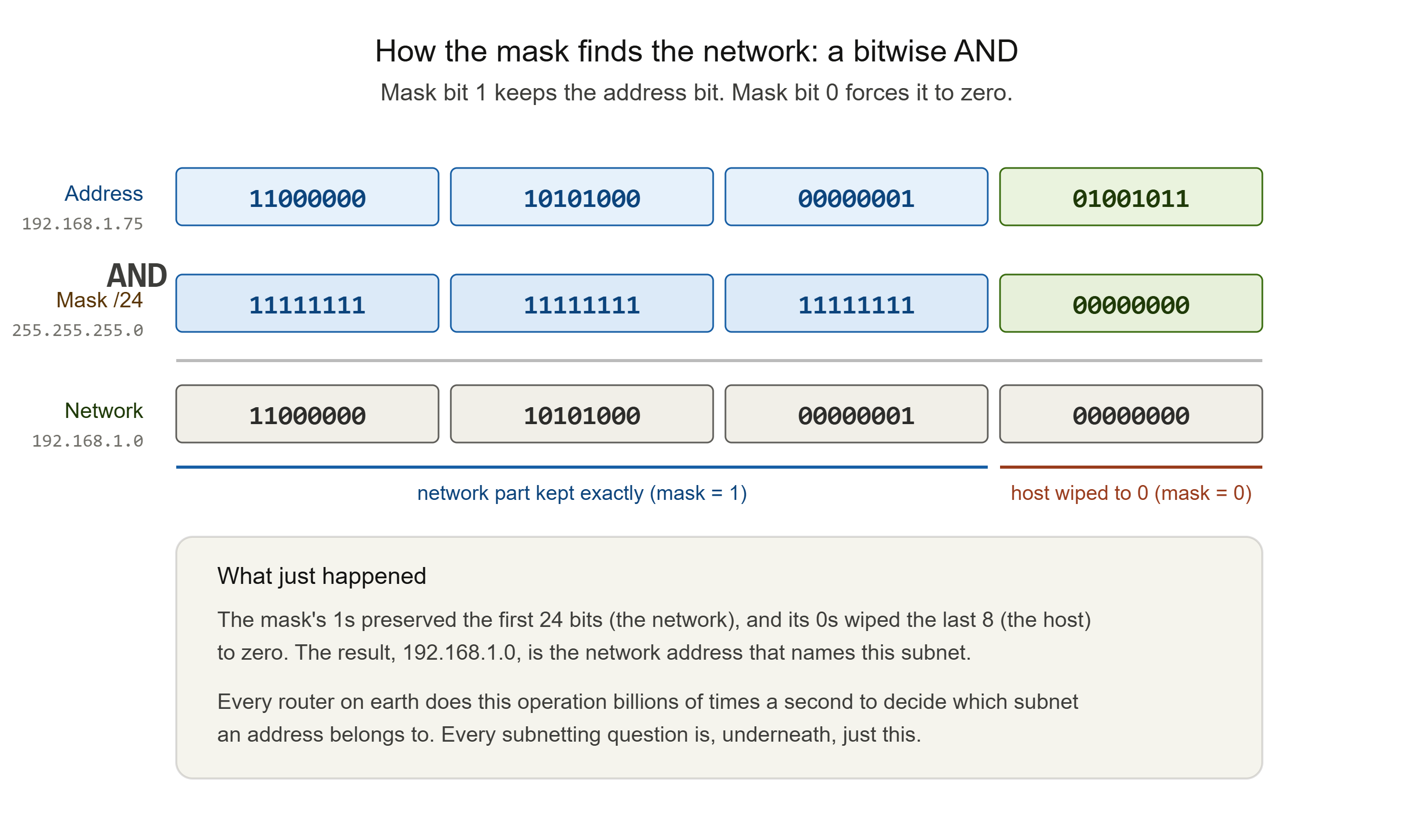
The mask's 1s preserve the network part exactly, and its 0s wipe the host part to zero, leaving the network address. This single operation, done in hardware billions of times a second, is how every router on earth decides which subnet an address belongs to. Every subnetting question you will ever face is, underneath, just this: line up the bits, apply the mask, read off the boundaries.
A note on IPv6 subnetting
IPv6 uses the exact same CIDR slash notation, so everything you just learned about prefixes transfers directly. The main practical difference is that IPv6 subnets are, by strong convention, a /64. That leaves 64 bits for hosts, which is 2 to the power of 64 addresses in a single subnet, about 18 quintillion. Because address space is no longer scarce, IPv6 subnetting is less about squeezing every address out of a tight block and more about clean, consistent structure. The maths is identical. The scarcity mindset is gone.
The Security Payoff: Subnetting Is a Security Control
Everything above was leading here, because subnetting is not only an addressing and performance tool. It is one of the most fundamental security controls in all of networking, and it connects directly to the earlier posts in this series.
Recall the firewall post Behind the Wall: What Firewalls Really See, Block, and Miss, where the real danger was not the attacker getting in, but the attacker moving sideways once inside, from a low-value machine to the crown jewels, across a flat internal network. Subnetting is the structural defence against exactly that. By dividing a network into segments, you limit the attack surface and obstruct lateral movement. If an attacker compromises one machine, they cannot automatically reach the rest, because the other subnets sit behind a router boundary where traffic can be filtered and blocked. A malware infection in one subnet does not spread to another. The internal walls contain it.
This practice, dividing a network into isolated segments to control traffic and contain breaches, is called network segmentation, and subnetting is its foundation. It is why you put IoT devices, those cheap cameras and thermostats with weak security, on their own separate subnet, so that if one is compromised, the attacker is trapped in a segment with nothing valuable, unable to reach your servers or workstations.
There is a second security angle worth understanding, from the attacker's side. When a penetration tester or a real attacker gains a foothold in a network, one of the very first things they do is reconnaissance: mapping the network to find out what else is reachable. They use tools like Nmap to scan address ranges and discover live hosts and open services. The subnet structure is one of the first things this reconnaissance reveals, because the subnet mask tells an attacker how many other devices share the segment and where the boundaries are. A tester can only test what they can reach, and an attacker can only attack what they can reach. Good segmentation directly shrinks the internal attack surface by shrinking what any single compromised position can see. This is the network layer's version of the same lesson the whole series keeps returning to: control, and the lack of it, is structural. It lives in how the system is divided.
Commands to See Your Own Addressing
Everything here is visible on your own machine right now.
See your own IP address, subnet mask, and gateway:
ipconfig            (Windows, look for IPv4 Address and Subnet Mask)
ip a                (modern Linux)
ifconfig            (macOS and older Linux)
Look at the address. If it begins with 192.168 or 10, you are looking at a private RFC 1918 address, and NAT is translating for you every time you reach the internet. Note the subnet mask too, very often 255.255.255.0, your /24.
See the difference between your private and public address:
Your machine knows only its private address. To see the single public address your whole network shares, you can search "what is my IP address" in a browser. Compare the two. The private one is what your laptop calls itself. The public one is what the entire internet sees. The gap between them is NAT at work.
See your route to a destination, and the addresses along the way:
traceroute google.com (tracert on Windows)
As in Post 2, every hop is a real router with its own address. Now you can read those addresses with understanding, spotting private ranges near your end and public ranges further out.
What You Now Understand
You started this post with a simple truth, that every device needs an address, and you now understand what that address actually is: a logical, changeable location marker at Layer 3, distinct from the fixed physical MAC address, exactly the mailing-address-versus-fingerprint split.
You know why the original IPv4 system, with its 4.3 billion address ceiling set in 1983, ran short, and the three responses that followed: private addressing, NAT, and ultimately IPv6 with its effectively limitless 128-bit space. You understand why your home network shares one public address, and you can now read your own private address and know what it means.
Most importantly, you did the thing most people give up on. You subnetted, in the right order. You understand why we divide networks before you memorised how, and then you did the how anyway: the network and host split, the subnet mask, CIDR notation, the host-counting formula, a full worked division of a /24 into four /26 subnets, and the bitwise AND underneath it all. And you saw that IPv6 uses the very same notation, just without the scarcity.
And you connected it back to the thread of the series: subnetting is not just plumbing, it is a security control. It is the structural foundation of network segmentation, the thing that contains breaches and obstructs the lateral movement that the firewall post warned about. Control lives in how a network is divided.
In the next post, we follow the address one step further. You now know how a device is located by its IP address, but you have never once typed an IP address to visit a website. You type a name, like google.com. The system that translates that human name into a machine address is DNS, the internet's phone book, and it is one of the oldest, most essential, and most quietly abused systems on the network. That is Post 5.
This is Post 4 of the Networking Foundations series. If subnetting finally clicked for you, in the right order this time, share it with someone still staring at a binary table wondering where to start. New here? Begin with Post 1, and Post 3 on the OSI model leads straight into this one. Subscribe to our newsletter to get each new post as it publishes.
Comments